Digital Signage for Restaurants: A Full Guide
What restaurant screens should show, where they go, the hardware and software to buy, what a 3-screen restaurant pays, and the rules on calories and fees.
Digital signage for restaurants is a set of TVs that show your menu, specials and promotions, switch from breakfast to lunch on a schedule, and change a price from a phone instead of a reprint. A typical counter-service restaurant starts with two or three menu screens behind the counter and one in the window. Each TV needs a media player behind it (about $40 to $100) and signage software (usually $6 to $30 per screen per month). Brix is one option for restaurant menu screens, at $6 per screen per month billed yearly, or $8 month to month.
What should a restaurant show on its screens?
- The menu board. Categories, items and prices behind the counter or over the ordering point. This is the screen that earns its cost.
- Day-parts. Breakfast until 11:00 am, lunch, dinner, happy hour and late night, each switching on its own at the set time.
- Specials and limited-time offers. Posted in the morning and taken down when they sell out or the offer ends.
- Combos and upsells. A featured combo or the item with the best margin, in its own part of the screen next to the full menu.
- A window or street screen. Today's special or a short loop of the food, readable from the sidewalk.
- Order status. A "Now serving" or order-ready number where customers wait.
- Reviews and social posts. Your Google star rating or recent Instagram posts, on a screen away from the menu.
Where should the screens go?
- Over or behind the counter, where customers decide while they queue. Two or three landscape TVs side by side are the classic menu board; one portrait TV per category also works.
- At the start of the queue, so customers have decided before they reach the till. A slow decision at the register costs more than any screen.
- In the window, facing the street, for people who have not come in yet.
- In the dining room or waiting area, for order numbers, desserts, drinks and loyalty sign-up.
- At the drive-through, where the board must be weatherproof and bright enough for direct sun.
What hardware does a restaurant need?
- The screen. 43 to 55 inches for a menu board, sized so the smallest price is readable from where customers stand. A rule of thumb for signs is 1 inch of letter height for every 10 feet of distance.
- Brightness. A home TV is fine indoors. A window facing the sun needs a high-brightness commercial display (these are commonly rated 2,500 nits or more), or it washes out by midday. Outdoor drive-through boards are their own product category.
- A media player behind each screen. The Amazon Signage Stick costs $99.99, an Android box such as the Walmart onn. 4K costs $39.98, and a BrightSign player costs $380 to $820 (list prices on each maker's store, September 2026).
- A wired network if you can. Restaurant Wi-Fi is shared with the POS, staff phones and guests. Amazon's micro-USB Ethernet Adapter for the Signage Stick costs $14.99.
- Power from a wall outlet, not the TV's USB port, which can drop voltage and make a stick reboot.
Can prices come from your POS?
Some signage software reads item names and prices from the point-of-sale system, so a price changed at the register changes on the board. Others read from a spreadsheet. Either is better than retyping prices into a design, which is how boards end up showing one price and charging another.
What does it cost for a typical restaurant?
For a restaurant with 3 menu screens behind the counter, on TVs you already own:
| Item | One time | Per year |
|---|---|---|
| 3 media players (Signage Stick at $99.99) | $300 | |
| 3 Ethernet adapters (optional) | $45 | |
| Software at $6 to $30 per screen per month | $216 to $1,080 |
New TVs are extra; a commercial display costs more than a home TV of the same size. Yodeck lists $8 to $16 per screen per month and OptiSigns $10 to $45 (their pricing pages, September 2026). See how much digital signage costs.
Rules that apply to restaurant menu boards
- Calories. In the US, a restaurant in a chain of 20 or more locations must show calories on its menu boards, including digital ones. See calorie labeling on digital menu boards.
- Service charges in California. A mandatory service charge must be shown, with its purpose, on any menu or display with prices. See California service charge law for menus.
Check with your local health department for other local rules.
Mistakes restaurants make with menu screens
- Too many items on one screen. Split the menu across screens or pages; keep each readable from the queue.
- Prices typed into an image. Every price change becomes a design job. Keep prices in data the board reads.
- A smart TV's own apps. Smart TVs update themselves and show their own home screen after a power cut. A separate player that starts straight into the menu avoids that.
- Guest Wi-Fi. Screens that share Wi-Fi with every diner freeze at the busiest hour. Wire them, and choose software that keeps playing from stored content when the network drops.
- Screens on all night. Turn them off when you close.
For step-by-step setup on one TV, see how to display a menu on a TV.
Where Brix fits
Brix is signage software that runs on the Amazon Signage Stick, Fire TV, Android boxes and Windows PCs. It costs $6 per screen per month billed annually, or $8 billed monthly, so the 3-screen restaurant above pays $216 a year. There is a 7-day free trial with no card.
- Menu Board app. Builds the board from a Google Sheet, a CSV or JSON file, or an API, with the columns Category, Item, Price, Description, Image, Sold out and Calories. Long menus change page on their own, sold-out items show with a line through or hide, and one line at the bottom holds a service charge or allergy notice.
- Calories. The US chain (FDA) setting formats calories and adds the two statements the rule asks for.
- POS. Brix connects to Toast, Square and Clover. Our team sets up the connection with you. Talk to us.
- Day-parts. Schedules switch breakfast, lunch and dinner on their own.
- Order numbers. The Now Serving app shows a number staff change from a phone.
- Opening hours. A new screen follows Standard hours, 6:00 am to 11:00 pm, and the Signage Stick turns the TV off outside them. See screen settings and display power.
- Offline. Content is stored on the player and keeps playing when the network drops.
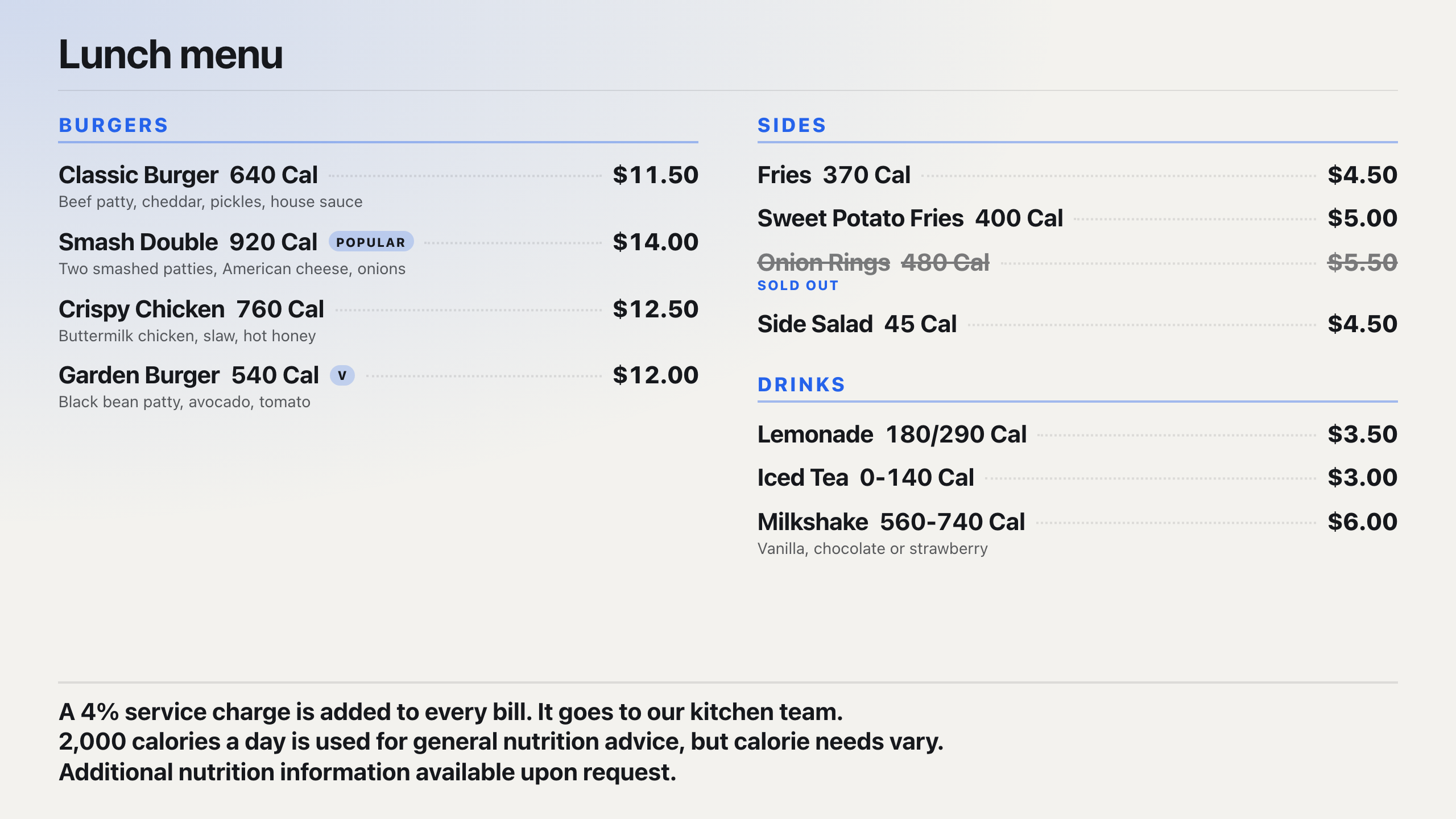
Setup takes about 10 minutes per screen. Brix does not sell screens and does not take orders: for self-order kiosks or a weatherproof drive-through system, go to a kiosk or drive-through specialist.
Start your free 7-day trial. No card needed. Several locations and want a walkthrough first? Book a demo.
Put Brix on your screens
Live in about 10 minutes. One plan: $6/screen/month billed annually ($8 month to month). No credit card to try.
Start Free TrialBrix for other industries