Single sign-on (SSO) for digital signage lets your team sign in to the signage software with the work account they already have, such as Microsoft Entra ID, Okta or Google Workspace. Your identity provider checks the password and two-factor rules, and when someone leaves, switching them off there stops their signage access too.
Good SSO also sets each person's role and locations from your directory, so nobody has to invite store managers by hand. Most signage vendors put SSO on their top plan, often with a minimum screen count, so check the plan before you compare prices.
What does SSO do for a signage team?
- No separate passwords. Everyone uses the password, passkey and two-factor rules your IT team already enforces.
- Leavers lose access. Switch someone off in your identity provider and they cannot sign in to the signage software.
- No invites. With just-in-time (JIT) provisioning, a new person gets an account at their first sign-in.
- Access that follows your HR data. With role mapping, the platform reads a person's group, job title or store number and gives them the right role at the right location.
- An easier security review. "Access is controlled through our identity provider" is the answer most IT teams want.
- No shared store logins. Every sign-in is a real person in your directory.
SAML or OpenID Connect: which does signage use?
Both are standards for SSO. Your identity provider signs a statement that says who the person is, and the signage software trusts it.
- SAML 2.0 is the older, XML-based standard. It is common in enterprise software and supported by every major identity provider, including on-premises Active Directory Federation Services (ADFS).
- OpenID Connect (OIDC) is the newer standard, built on OAuth 2.0 and JSON. Entra ID, Okta, Google Workspace, Auth0, OneLogin and Ping all support it.
For most teams the choice does not matter: your identity provider speaks both. It matters only if your provider or your policy allows one of them. Ask IT which one they prefer before you shortlist vendors. Most signage vendors support SAML; a few support OIDC.
What is SCIM, and do you need it?
SSO checks a person only when they sign in. SCIM (System for Cross-domain Identity Management) lets your identity provider push changes to the signage platform as they happen:
- Leavers are signed out at once. Without SCIM, a session someone already has lasts until it expires, even after you switch them off.
- Moves apply straight away. A move to a new store changes their access now, not at their next sign-in.
- New starters are ready before day one, with their role and location, so you can pick them as approvers ahead of time.
Most small teams do not need it: JIT provisioning at sign-in covers them. Ask for SCIM if you have high turnover across many locations, or a compliance rule that access must end immediately.
How does SSO give each person the right locations?
With rules that turn directory data into access, so access follows your HR data and nobody raises a help-desk ticket to get the right stores. Your identity provider already knows each person's groups, job title, store number and region. The signage platform reads those values (called claims in OIDC, attributes in SAML) at sign-in and applies rules such as:
| Who | Rule | What they get |
|---|---|---|
| Global admin | group is signage-admins | Admin across every location |
| Regional manager | title is Regional Manager | Content editor for their region and every store in it |
| Store manager | title is Store Manager | Content editor at their own store only |
For this to work, each location in the signage platform needs an ID that matches the value in your directory, such as a store number. Ask vendors whether their mapping can place a person at a location, or only give a workspace-wide role. Some map groups to roles but cannot place a person at a single store. See digital signage user permissions by location.
Which plan includes SSO?
From each vendor's pricing page and help center, read September 2026. Prices are per screen per month.
| Vendor | Plan with SSO | Standard | SCIM | Price |
|---|---|---|---|---|
| OptiSigns | Pro Plus | SAML, groups mapped to teams and roles | Not documented (JIT at sign-in) | $13.50 annual, $15 monthly |
| Kitcast | Pro | SAML and OIDC; help center calls SSO a paid extra set up by support | Entra ID, Google Workspace | $10 annual, $14 monthly |
| Yodeck | Enterprise | SAML, groups mapped to roles per workspace | Okta, Entra ID, OneLogin | $16 |
| Rise Vision | Enterprise | SAML | Not documented | $180 per display per year |
| NoviSign | Premium | SAML | Not documented | $25 annual, $28 monthly |
| Fugo | Enterprise | SAML and OIDC | Not documented | $40 annual |
| Screenly | Enterprise | SAML | Not documented | $38 annual, from 25 screens |
| ScreenCloud | Enterprise, or a paid add-on on Pro | SAML | Okta, Entra ID (Enterprise) | Quote; 35-screen minimum |
| Spectrio | Enterprise package | SAML | Not documented | Quote |
Many of these vendors also let people sign in with a Google or Microsoft button on lower plans. That is convenient, but it is not the same as SSO: people can usually still sign in with a password instead, and roles do not come from your directory.
What should you ask a signage vendor about SSO?
SSO problems rarely show up in a demo. They show up when IT tries to connect. Ask:
- Which plan includes SSO? Is there a minimum screen count or an extra fee?
- SAML, OIDC or both? Is our identity provider on your list?
- Can we set it up ourselves, or does it need a support ticket?
- Can we test the connection before we require SSO for everyone?
- Can rules place a person at a region or store from our directory data, or only give a workspace-wide role?
- Can we see what access a person will get before they sign in?
- Which providers support SCIM, and on which plan?
- How long does a session last, and what happens to it when we switch someone off?
- If our identity provider is down, how does an owner still get in?
For the wider buying checklist, see questions to ask a digital signage vendor. For the rest of IT's review (encryption, logging, recovery, contract terms), see the digital signage security questionnaire guide.
Single sign-on in Brix
Brix includes SSO and SCIM on its one plan: $6 per screen per month billed annually, or $8 billed monthly. There is no minimum screen count, and you set it up yourself under Settings > Security: add the connection, prove each email domain with a DNS TXT record, run a test sign-in, then add access rules. Every field is in the single sign-on setup guide.
- Standard: OpenID Connect only. It works with Microsoft Entra ID, Google Workspace, Okta, Auth0 and any other OIDC provider. Brix does not support SAML: if your provider offers only SAML, ask IT whether an OIDC app is available.
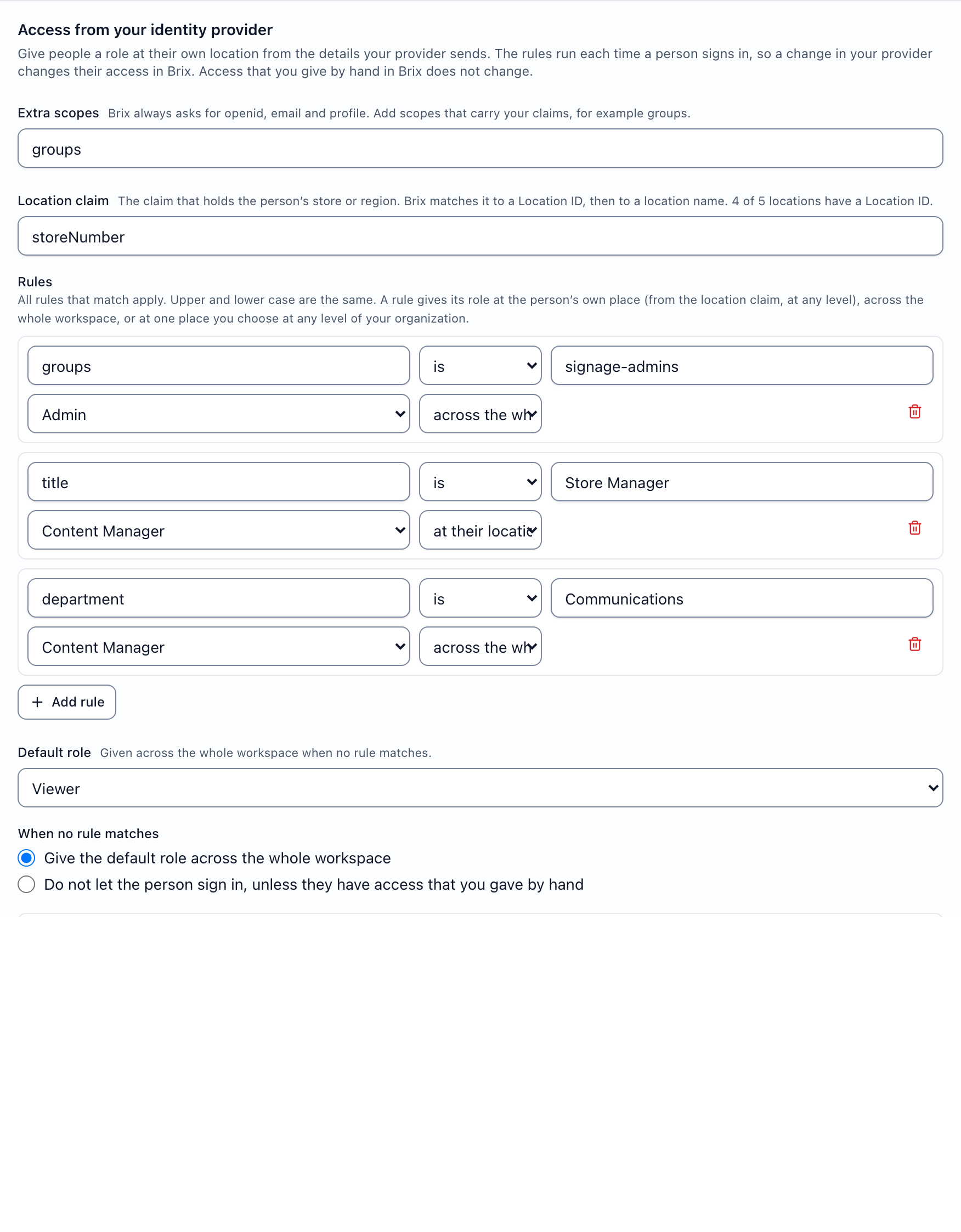
- Access rules: a rule reads a claim such as
title,groupsordepartmentand gives a role at the person's own location (from a claim such asstoreNumberorregion), across the whole workspace, or at one place you choose. A regional manager whose claim saysWESTgets the West region and every store in it. If no rule matches, you choose a default role or refuse the sign-in. Access you give by hand is never changed by a sign-in.
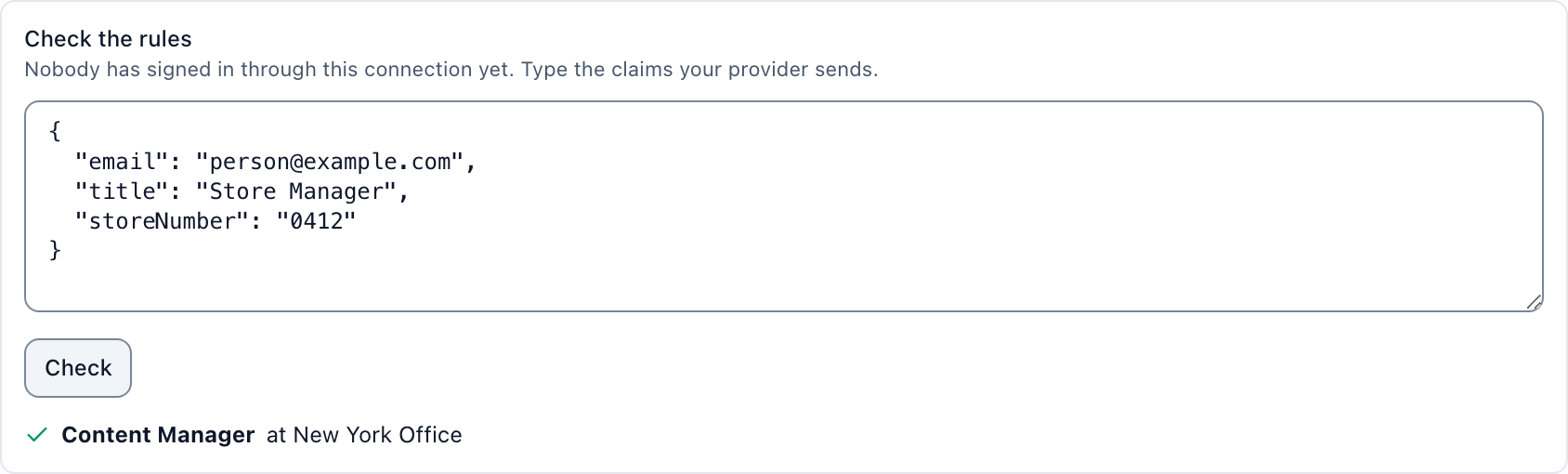
- Check the rules: paste the claims for one person, or reuse the last real sign-in, and see exactly which role they would get and where before you save. It also names any store number that matches no location.
- SCIM: works with Okta and Microsoft Entra ID. Without SCIM, a session lasts up to 30 days or until you remove the person by hand.
If your IT team requires SAML, or a SOC 2 report, Brix is not the right fit. Start a free 7-day trial to set up SSO in your own account, no card needed, or book a demo for a rollout across many locations.