No. One Amazon Signage Stick per screen cannot make a true video wall, where one picture spans several screens: each Stick has one HDMI output, plays on its own clock, and Amazon lists no wall, sync or multi-display feature for it. Sticks are fine for a row of screens that each show their own content, such as menu boards side by side. For a spanned wall, use wall displays, a video wall controller, a multi-output PC or synced players.
One exception: a single Stick can feed a wall if the displays or a controller split its 4K picture (see below).
What does a video wall need?
A video wall is two or more displays acting as one large screen. To look like one screen it needs:
- A split. Something cuts one picture into tiles: a controller, a graphics card, the displays or the software.
- Frame sync. Every tile changes on the same frame. A few frames late and a moving car jumps at each seam.
- Bezel compensation. The pixels behind each bezel are dropped, so lines stay straight across the gap.
- Content at the wall's shape. A 2x2 wall of 1080p screens is 3840 x 2160 (16:9). A 3x1 row is 5760 x 1080, which normal 16:9 content does not fill.
Why four Sticks do not make a wall
The Stick has one HDMI 2.1 output (up to 4K at 60 Hz), a quad-core 2.0 GHz processor, 2 GB of memory, 16 GB of storage and Wi-Fi 6E. It plays one screen very well. For a wall:
- One output, one screen. It cannot send parts of a picture to several screens.
- No shared clock. Four Sticks start the same playlist and drift apart. Stills hide it; video shows it at every seam.
- Wi-Fi is the wrong network for sync. Players that sync walls use a wired network; BrightSign's documentation says sync over Wi-Fi is not supported. Each Stick needs an adapter for Ethernet.
- No bezel compensation. You would cut every video into tiles yourself, again for each change.
If a CMS says it can sync Signage Sticks, test it with fast-moving video on your own screens before you buy.
What works instead?
| Option | How it works | Good for |
|---|---|---|
| Wall displays with daisy chain | One player feeds the first display; the displays split the picture | 2x2 and larger walls of one display model |
| Displays with a built-in player and wall mode | Each display plays its own tile | No players behind the screens |
| Video wall controller | One input, several synced outputs, cropped and scaled | Any displays, mixed sources |
| Windows PC with a multi-output graphics card | The driver treats all screens as one desktop | Walls that also show dashboards or live data |
| Synced players, one per screen | Players on a wired network share a clock | Very large walls, walls with zones |
Examples, from each maker's own pages:
- Samsung VM55B-U: 3.5 mm bezel to bezel; daisy chain over DisplayPort 1.2 or HDMI shows UHD across several screens with no external graphics card.
- LG 55VM5J-H: Tile Mode for walls up to 15 x 15, each display playing its own tile.
- Datapath Fx4: one input up to 4K 60 Hz, four genlocked outputs, no PC needed; units chain for bigger walls.
- NVIDIA Mosaic: one desktop across up to 16 displays from one PC, with bezel correction.
- BrightSign: one player per screen, synced with PTP over a wired network.
With daisy-chained displays or a controller, the player can be one small player, even a Signage Stick. For a 2x2 wall of 1080p screens, one 4K picture maps one-to-one onto the four screens. Ask the display or controller maker whether its input accepts your player's HDMI signal (HDCP) before you buy.
What does each option cost?
- Four Sticks: 4 x $99.99 in players plus four software licences, and the wall is still not in sync.
- Synced players: BrightSign's own store lists players from $380 to $1,335 each, one per screen.
- Wall displays and controllers: usually sold by AV resellers on a quote. They need only one player for the whole wall, and most signage software prices per player, so one licence.
Mounting and alignment matter as much as the player: gaps between screens look worse than any sync problem.
When are Signage Sticks fine for several screens?
When nothing crosses from one screen to the next:
- Menu boards side by side: breakfast, lunch and drinks, each complete on its own screen.
- A row of promotion screens where a small time difference does not matter.
- A portrait strip by an entrance, one poster per screen.
- Screens that change at the same time of day. A schedule switches all of them at, say, 11:00, even without frame sync.
Give each screen its own complete design and margins, never run text or a product across two screens, and use the same template and fonts so the row looks planned. For menus, see how to turn a TV into a digital menu board.
Where Brix fits
Brix does not split one picture across screens and has no synced video wall mode. For a spanned wall, use a setup from the table above.
For several screens side by side:
- Each screen plays its own playlist, or several share one.
- Select several screens on the Screens list to change content, hours or Wi-Fi together, or save them as a group.
- Set each screen's orientation, so portrait and landscape screens run from one account.
- On the Signage Stick and Fire TV you can take screenshots, reboot and turn the TV on and off from the CMS.
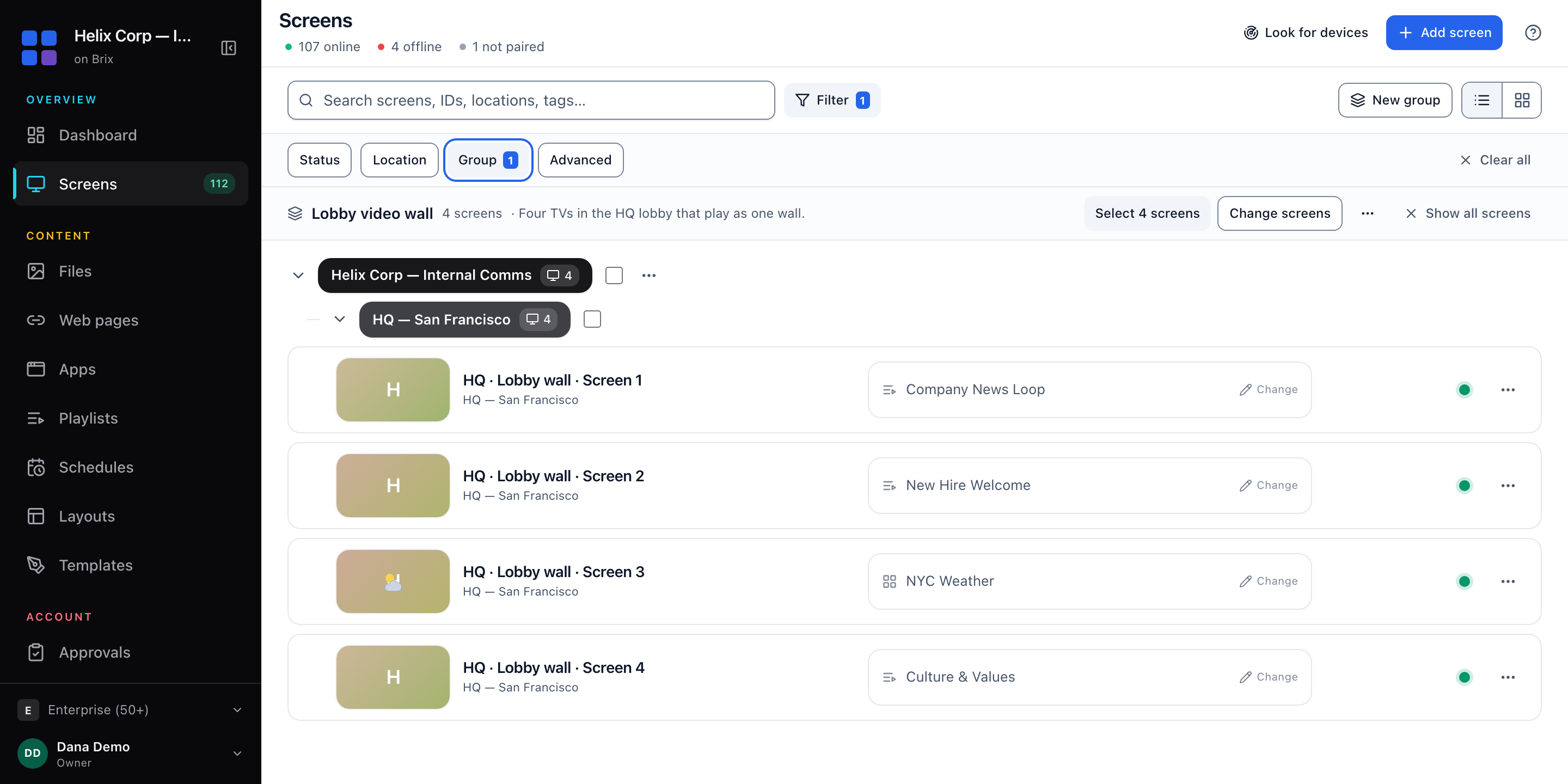
If your wall uses a controller or daisy-chained displays, Brix can be the one player in front of it, on a Signage Stick or a Windows PC. Test it with your hardware first: the 7-day free trial needs no card.
More on the Stick: the Amazon Signage Stick review and its price and cost per screen.