The cheapest digital signage player is a TV that already has Google TV or Android TV built in: no extra box to buy. A Walmart onn. streaming device or an Amazon Fire TV Stick costs less than the Amazon Signage Stick, but you give up two things the Stick does: restart it without visiting the screen, and turn the TV off at night by itself.
Players over $100 on their own, such as the NVIDIA Shield TV ($149.99), are not in the table.
Cheap digital signage players under $100, with the real 3-year cost
A player price is not the real cost. Signage software bills every month, so a $39.98 onn. box on the $8 monthly plan ($327.98 over three years) costs more than a $99.99 Signage Stick on the $6 annual plan ($315.99). The table below adds Brix's own price ($6 per screen per month, billed annually) to each player's one-time cost, over 36 months:
| Player | One-time hardware | Remote restart + screen off | 3-year software (Brix, billed annually) | 3-year cost per screen |
|---|---|---|---|---|
| TV with Google TV or Android TV built in | $0 | No | $216.00 | $216.00 |
| Walmart onn. 4K Streaming Device | $39.98 | No | $216.00 | $255.98 |
| Amazon Fire TV Stick 4K Plus | $69.99 (list) | No | $216.00 | $285.99 |
| Amazon Signage Stick | $99.99 | Yes | $216.00 | $315.99 |
Billed monthly instead of annually (no yearly commitment)? Add $72 to every row: Brix is $8 a screen a month on the monthly plan, or $288 over three years. The Signage Stick has no Ethernet port. If you need a wired network, add its micro-USB adapter, $14.99.
"Remote restart + screen off" means Brix can reboot the player and turn the TV off outside opening hours without anyone at the screen. Amazon enrolls the Signage Stick in its own remote-management API for this. A Fire TV Stick, a Walmart onn. box and a TV's built-in Google TV or Android TV do not give a third-party app that level of control. You restart those by unplugging them. A new Signage Stick screen defaults to "Standard hours" (6:00 am to 11:00 pm); set it to "Always on" in the CMS for a screen that runs around the clock.
Which box behind the TV should you buy?
- You already own a TV with Google TV or Android TV built in: install Brix from Google Play on the TV. No new hardware, so this is the cheapest option on the table above.
- One or a few screens you can reach to restart by hand: a Walmart onn. box. Grant it "Display over other apps" by hand once, then install Brix from Google Play.
- A screen at another site, or one nobody wants to walk up to and unplug: the Amazon Signage Stick. During its own on-screen setup, pick "Brix Signage", then pair it in the CMS. Setup takes about 10 minutes, and it is the only player here Brix can restart and turn off remotely.
- Rolling out 30 or more screens: Amazon provides Signage Sticks free for 30+ screens, which changes the math; see the cost breakdown for a 30-screen rollout.
What these players cannot do
- No remote restart, except on the Signage Stick. A Fire TV Stick, an onn. box and a built-in Google TV or Android TV all need someone at the screen to unplug them if the player locks up.
- No automatic screen-off, except on the Signage Stick. It turns the TV off outside Screen hours over HDMI-CEC. The others stay on, or need the TV's own sleep timer.
- A Raspberry Pi is not on this list. A Raspberry Pi 4 from $35 runs Brix only as the browser player, unmanaged: no remote restart, no automatic screen-off, and no offline guarantee beyond the browser cache. See Raspberry Pi vs. the Amazon Signage Stick for what a Pi build takes.
- Less storage, usually. A Signage Stick reports about 12 GB of usable storage. The Walmart onn. 4K Streaming Device above lists 8 GB. Brix caches content using up to half of whatever storage the player reports, so a smaller box caches fewer files for offline playback.
- Will a cheap stick hold up running all day? Power it from a wall adapter, not the TV's own USB port, if it runs around the clock: a stick drawing power from the TV's USB port can run short of power under continuous use. The Amazon Signage Stick plugs into mains power.
How a cheap player connects to Brix
Every supported player, from a $0 built-in TV to the Signage Stick, pairs with Brix the same way once the app is installed:
- Install Brix: pick "Brix Signage" during the Signage Stick's own setup. On a Fire TV Stick, install Brix from the Amazon Appstore. On an Android box or a TV with Google TV or Android TV built in, install Brix from Google Play.
- In the Brix CMS, go to Screens, select Add screen, then Pair a hardware device.
- Type the 6-digit code the screen shows.
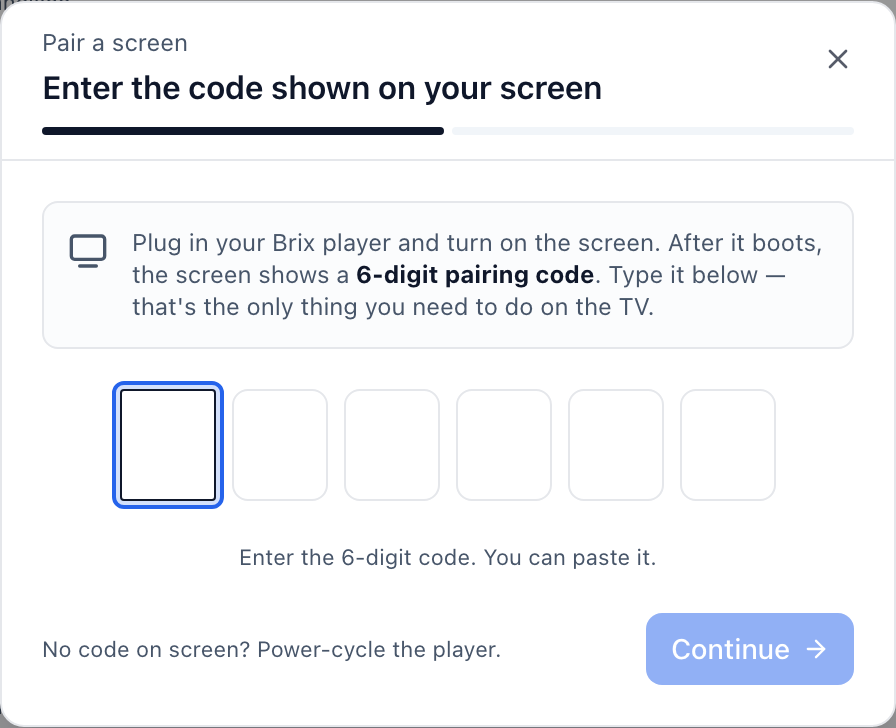
Across Brix's own fleet, pairing a Signage Stick takes a median of 2.6 minutes from the code appearing on the TV to the screen showing up in Brix.
FAQ
What is the cheapest digital signage player that works with Brix?
A TV that already has Google TV or Android TV built in. It needs no new hardware: install Brix from Google Play and pair it. Your only ongoing cost is the $6-a-screen-a-month Brix plan, billed annually.
Does a Fire TV Stick or a Walmart onn. box work with Brix?
Yes, both are supported players. Neither gives Brix remote restart or an automatic screen-off schedule the way the Amazon Signage Stick does, so plan to restart them by hand if one locks up.
Can you run Brix on a Raspberry Pi?
Yes, as an unmanaged browser player: no remote restart and no automatic screen-off. For managed hardware, use the Amazon Signage Stick, Fire TV, an Android box, or a TV with Google TV or Android TV built in.
Do these cheap players need a wired network?
It depends on the player. The Signage Stick and the Fire TV Stick 4K Plus both take Amazon's micro-USB Ethernet Adapter ($14.99 extra; neither has an Ethernet port of its own). Many TVs with Google TV or Android TV built in have their own Ethernet port. Check the onn. box's own listing before you plan a wired network.
Is the Signage Stick worth $30 more than a Fire TV Stick?
Yes, if you cannot walk up to the screen to restart it. The Signage Stick costs $30 more up front than a Fire TV Stick 4K Plus: $315.99 against $285.99 over three years. In return it is the only one of the two Brix can restart and turn off on a schedule without anyone on site.
A free, no-card 7-day trial lets you pair a cheap player and see your real cost per screen before you commit. Start a trial.