White label digital signage software is a signage platform that a reseller sells under its own name. The best one for a reseller rebrands the console, the customer email and the player app, lets you bill your customers yourself, and lets you put a real screen on a client's wall before you pay.
The vendor still runs the servers and the player software. You sell, bill and support your customers under your brand.
Who buys white label digital signage software?
The buyer is usually an AV integrator, an IT provider or a managed service provider that already sells and installs screens. It wants to sell the signage software as its own product, not send customers to the vendor's website.
A reseller that is happy for the customer to know the vendor's name does not need white label. A normal reseller deal is faster to start.
Reseller vs white label: what is the real difference?
| Reseller | White label partner | |
|---|---|---|
| Name on the login, screens and email | The vendor's | The reseller's |
| Who sets the price | The vendor; the reseller earns a margin | The reseller |
| Who bills the customer | Often the vendor | The reseller |
| Who owns support | Shared | The reseller |
| Setup work | None | A logo, a product name, often a domain and a mail connection |
With white label, the customer knows the product as yours. It is not a name it can look up and buy direct next year.
What does white label digital signage rebrand?
A real white label programme rebrands every surface your customer sees, not only the login page. Check each row before you sign.
| Surface | What a full programme rebrands | What often still shows the vendor |
|---|---|---|
| Web console | Logo, product name, colours, the web address | Nothing the customer sees |
| Customer email (invites, password resets, alerts) | Sender name, sending address, the text | The sender address, if you cannot connect your own mail |
| Player app on the hardware | App name, icon, package name, installer | All of these, if the vendor has no separate build |
| Pairing screen before a device is claimed | Logo and web address removed | The vendor's logo and address |
| Error messages on the screen | Point the viewer to "your provider" | The vendor's server name |
| Network traffic from the device | Almost nothing | The vendor's server addresses |
Buyers skip the last row. Unless the vendor runs a separate server domain per partner, your customer's IT team sees the vendor's address in its firewall logs. If a vendor says no trace of it shows anywhere, ask to see the device's network traffic.
Which white label digital signage software is best for resellers?
The best one is the platform whose branding goes deepest and whose terms let you start small. These are the questions that separate the programmes:
- Email: can customer email go out through your own Microsoft 365, Google Workspace or mail server?
- Player app: is there a separate player build with no vendor name, icon or package name?
- Billing: do you bill your customers yourself, at your own price?
- Start: can you sign up and pair a screen without a sales call?
- Hardware: does it run on the players your customers already buy?
What each vendor's own white label page lists:
- Rebrands: logo, favicon, menu and background colours, a custom web address and the player app icon.
- To start: a demo and a consultation, then a partnership form. After approval you get a partner console.
- Rebrands: your own domain, logo and colours on the dashboard and on its Android and commercial-display player apps.
- To start: a call with an expert, then an account manager.
- Rebrands: logo, interface and the customer experience.
- To start: a meeting with a channel sales specialist, then access to its Partner Portal.
- Rebrands: your domain, logo, colours, platform name, the CMS and its player apps for Android and commercial screens.
- To start: a white label demo on request.
- Rebrands: the interface, login screen, reporting and domain.
- To start: demo accounts and pre-sales technical support.
Brix
- Rebrands: product name, logos, accent colour, web address, customer email (sender and text), and separate Windows and Android player builds.
- To start: sign up on the partner page. Your partner console and a demo workspace with 5 free screens are ready at once.
For a wider list that is not about reselling, see the best digital signage software.
How does Brix white label work for resellers?
Brix gives each partner a partner console. You manage your customers, your branding, your team and your licences there. Each customer gets its own workspace, separate from the others.
Branding and your own address
- Brand: your product name, a logo for light backgrounds and one for dark backgrounds, and an accent colour. Your customers see your logo on their screens, on the sign-in page and in email.
- Address: add a hostname on your domain, for example
screens.yourcompany.com, and point a CNAME record at it. Brix handles the certificate. - Before your domain is live: your customers use a neutral console address that does not name Brix.
- Legal pages: link your own terms and privacy pages.
Customer email from your own domain
- Default: invites, password resets and alerts go out under your product name from a neutral address. Replies go to your support email.
- Your own mail: connect Microsoft 365, Google Workspace, a Resend account or an SMTP server. Email then goes out through your own system. Microsoft 365 and Google Workspace need no DNS change.
- The words: edit the text of each automatic email, and set the email language for all customers or for one.
Customers and your team
- Add a customer: give it its own login, or keep it managed by your team with no customer login.
- Roles: Owner, Admin, Content Manager or Viewer. Billing always stays with you.
- Working in their workspace: open it from your console. The customer sees each visit in its Activity log.
- Content: share items from your library live with many customers at once. They see your latest version and cannot change it. Or copy items, and the customer can change its own copies.
- Region: when you add a customer, choose the region where its data is stored. The console cannot change it later. Our support team moves a customer to another region.
Player apps with no Brix name
The white label players are separate builds for Windows and for Android and Fire TV devices. You download them from your own console address.
- Name: "Signage Player", with a neutral icon and a package name with no vendor name in it.
- Pairing screen: no logo and no web address before the screen is claimed.
- Errors: a firewall error on the screen tells the viewer to contact their provider.
Licences and price
- Price: $6 per screen per month billed annually, or $8 billed monthly with no commitment. Prices are in US dollars.
- How it counts: you buy licences in the partner console. A customer screen uses one licence when it is paired. Licences added mid-term are charged pro rata to the same renewal date.
- Your price: you bill your customers yourself, at any price. They never see a Brix price.
- Unlicensed screens: a customer screen that no bought licence covers shows a small DEMO mark until you add a licence.
The demo
You get a demo workspace with 5 screens that are free for 30 days. They play everything, with a small DEMO mark. Buy licences before the 30 days end to keep the demo screens on. A demo licence cannot be used on a customer screen.
How to start as a Brix partner
- Fill in the form on the partner page. Brix emails you two links: one for the partner console, one for the demo workspace.
- In the partner console, add your product name and logos.
- Add a hostname on your domain and point its CNAME record at the address the console shows.
- Connect your Microsoft 365, Google Workspace, Resend or SMTP mail, and send a test email.
- Add your first customer and choose its region.
- Install the white label player on the screen and pair it in that customer's workspace.
- Buy licences before your 30 demo days end.
When Brix is not the right fit
- Samsung Tizen, LG webOS or BrightSign players: Brix does not run on them. Plug an Android, Amazon Signage Stick or Windows player into HDMI, or pick a vendor that supports those players.
- A vendor name that must not appear anywhere: the device still talks to
api.brixsignage.comandplayer.brixsignage.com. Anyone who reads its network traffic can see that. Say so in your reseller agreement.
Just want your own logo, not a reseller programme?
If you run one company and only want your own logo and colours on your own screens, you do not need a white label contract. Brand Kit is a standard setting: one company name, a logo and two brand colours for your own workspace. It carries through to on-screen apps such as weather and the clock, and to templates.
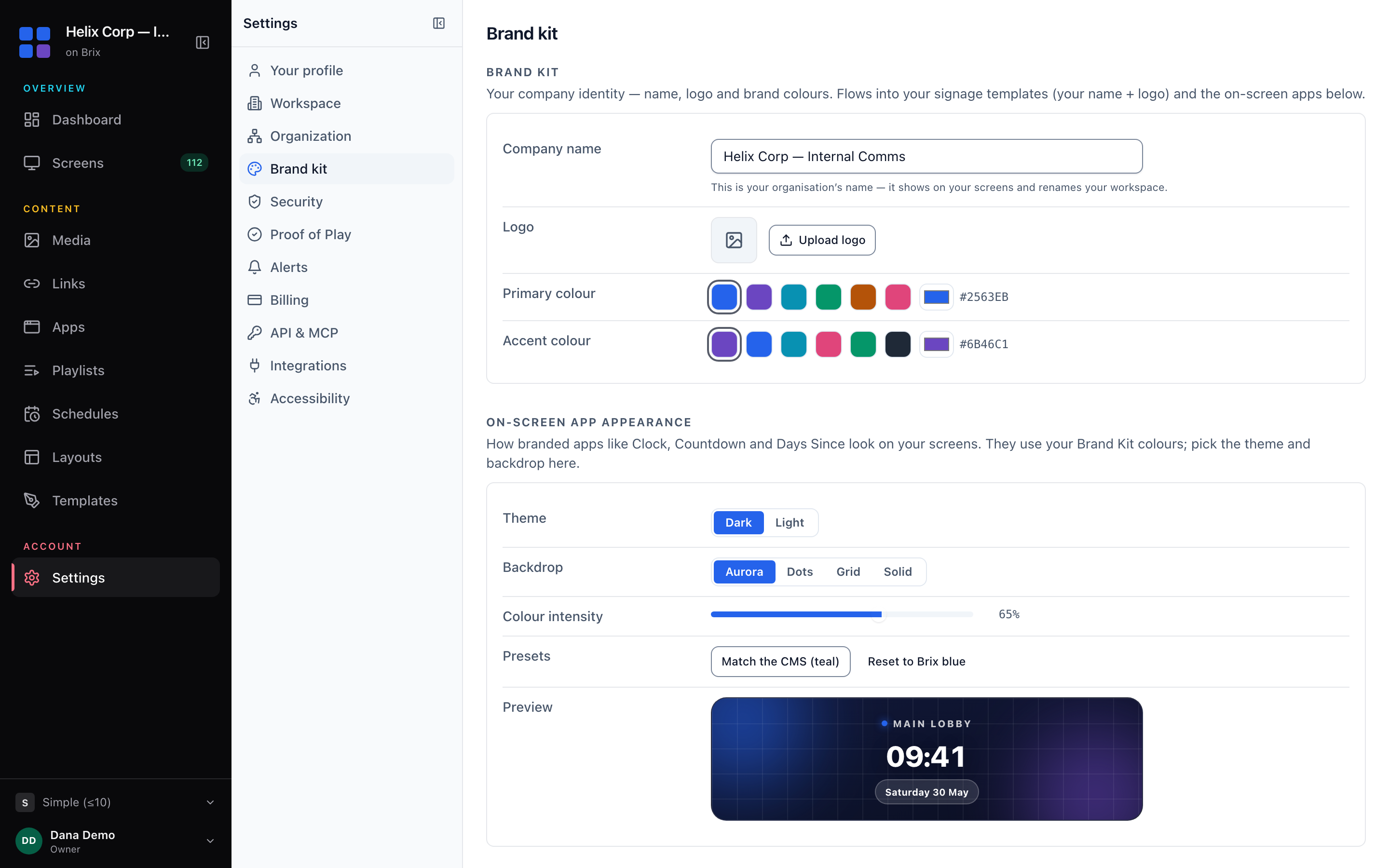
Brand Kit does not change the sign-in page, and it does not let you resell the software. The partner programme does that.
FAQ
How much does white label digital signage software cost?
Most vendors charge the reseller a wholesale rate per screen and let the reseller set its own price. Many do not publish the rate. Brix charges partners $6 per screen per month billed annually, or $8 billed monthly, and you set your customers' price. Compare it with the Brix pricing for direct customers.
Can white label digital signage send email from my own domain?
With some vendors, yes. Ask to see a password-reset email that one of your customers would get. In Brix, connect your Microsoft 365, Google Workspace, Resend or SMTP mail, and customer email goes out from your own address.
Is there a minimum number of screens?
Not with Brix. You buy as many licences as you need and add more during the term. For other vendors, see the questions to ask a digital signage vendor.
Can my customers tell the software is Brix?
Not from the console, the email or the player app. Only the device's network traffic shows Brix server addresses.
Talk to us to see the partner console and the player builds.