Screenly's commercial product grew out of Anthias (formerly Screenly OSE), the free, open-source digital signage project for Raspberry Pi that Screenly still maintains. Buyers who outgrow a self-built Pi network, or want a lower price, usually look at one of six alternatives: Yodeck, OptiSigns, piSignage, Xibo, PosterBooking or Brix.
Why people leave Screenly
Screenly's paid product runs on its own Screenly Player and Player Max, on Raspberry Pi, and through apps for Android and Samsung Tizen, and charges per screen per month. Buyers switch away when they want:
- A player they do not have to build. Anthias users run a Pi board, SD card, power supply and case that they source and maintain themselves.
- A lower starting price. Screenly Starter costs $15 per screen per month billed annually (or $17 billed monthly), for up to 5 screens. Business costs $24 per screen per month billed annually (or $27 billed monthly), minimum 5 screens. Enterprise costs $38 per screen per month, billed annually only, minimum 25 screens.
- A free tier. Screenly's paid product has none, only a 14-day free trial. Anthias is free, but self-hosted, with no support from Screenly's team.
Screenly itself renamed its open-source project to Anthias in 2022 to separate the free Pi project from the paid Cloud product. Buyers who want neither a self-hosted Pi nor Screenly's per-screen price look at the options below.
Compare the alternatives
| Vendor | Price | Best for |
|---|---|---|
| Brix | $6 per screen per month billed annually, or $8 billed monthly | Supported hardware instead of a Pi, with a 7-day free trial |
| Yodeck | Free for 1 screen, forever; $8 per screen per month from there | Starting free, then growing on the same software |
| OptiSigns | Free for up to 3 screens; $9 per screen per month billed annually | Wide device support plus a usable free tier |
| piSignage | 2 player licenses free forever; $35 for a new player's first year, $20 a year after | The pricing model closest to what an Anthias user already expects |
| Xibo | Core CMS and Windows player free to self-host; no USD price published for the hosted cloud CMS | Staying fully open source and self-hosted, at larger scale than Anthias |
| PosterBooking | Free for up to 10 screens (watermarked); $52 a month for 10 screens on Home Basic | The largest free hosted tier of any vendor here |
Brix
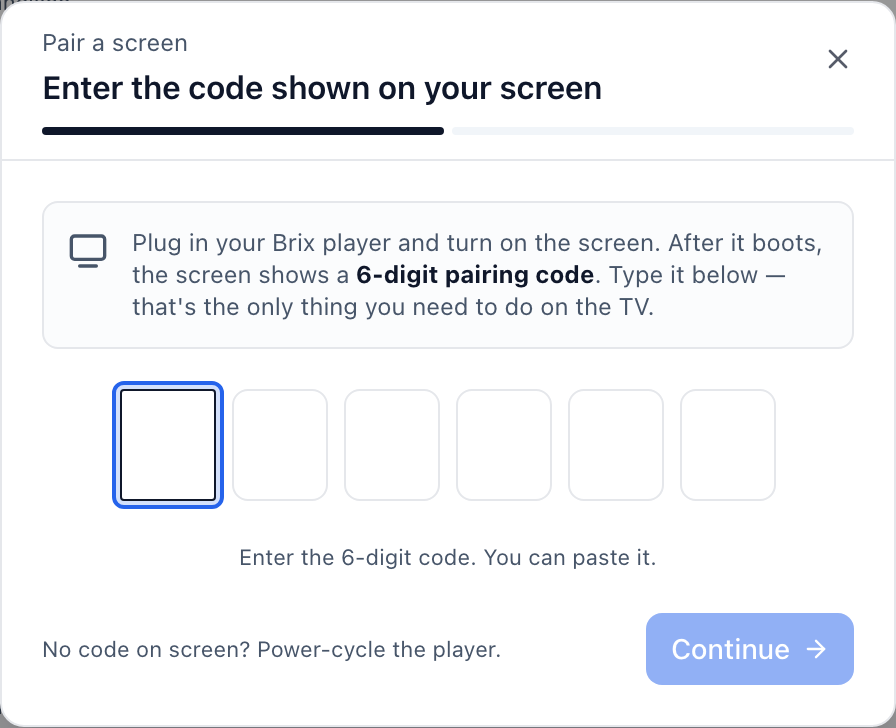
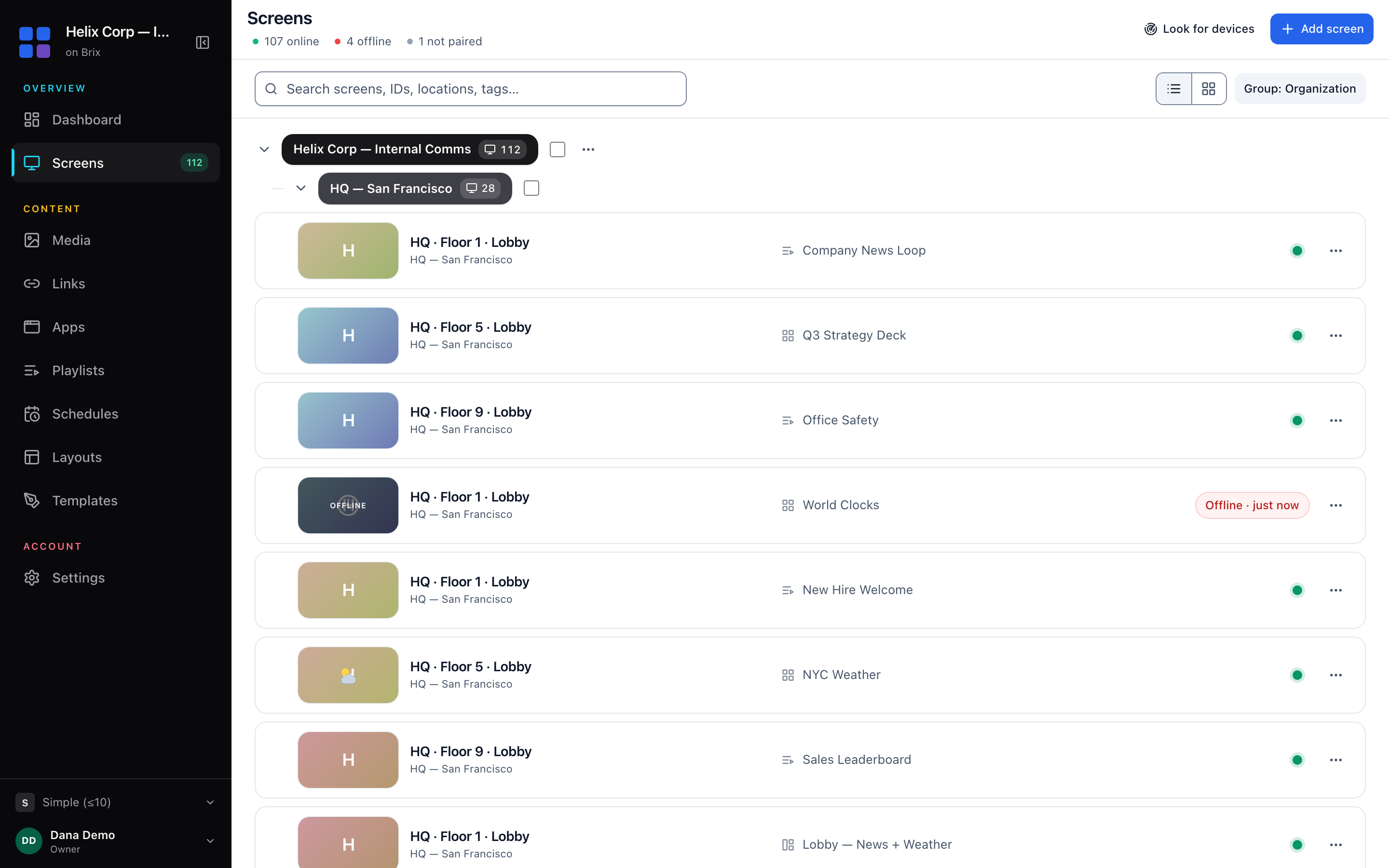
Price: $6 per screen per month billed annually, or $8 billed monthly. 7-day free trial, no card needed. See current plans. Best for: Leaving Pi hardware behind for a supported device without losing remote management. Players: The Amazon Signage Stick ($99.99), Fire TV, Android boxes (including the Walmart Onn), Android TV built into a TV, and a Windows player. Strengths: Setup takes about 10 minutes: plug in the Stick, pick Brix Signage on its own setup screen, then pair it in the CMS.
Brix also places a workspace's media, database and live connection in the US, EU, Oceania or Asia-Pacific region automatically, based on the country it signs up from.
Watch out for: Brix has no free plan, only the 7-day trial, and it is not open source or self-hosted. If keeping your own server, the way Anthias or Xibo does, matters more than supported hardware, Brix is not the right fit.
For rollouts of 30 or more screens, Amazon supplies the Signage Sticks free. Talk to us and Brix arranges it with Amazon.
Yodeck
Price: Free for 1 screen, forever. Basic is $8 per screen per month, the same rate monthly or billed annually. Premium is $12, Enterprise is $16. Best for: Teams who want to start on a free plan, then move to a paid tier without changing software. Players: Yodeck sells its own player hardware, or you run the software on a device you already own. Strengths: The free tier is a real single-screen license with no time limit. An annual plan includes a Yodeck Player at no extra cost. Watch out for: The free plan covers only 1 screen, and the Premium and Enterprise tiers cost $12 and $16 per screen per month.
OptiSigns
Price: Free for up to 3 screens. Standard is $9 per screen per month billed annually (or $10 billed monthly). Best for: Buyers who want a wide range of supported devices and apps. Players: Runs on Android, Chrome OS, Windows, the Amazon Signage Stick and Raspberry Pi, plus OptiSigns' own OptiStick player ($99.99). Strengths: The free tier covers 3 screens with a working app library, not just a demo. Watch out for: Higher tiers (Pro Plus, Engage, Enterprise) add cost quickly for advanced features; Enterprise requires a minimum of 25 screens.
piSignage
Price: The first 2 player licenses are free, forever. A new player costs $35 for its first year, then $20 a year after that. Best for: An Anthias user who wants to keep the same low, hardware-first cost structure, rather than a flat monthly subscription. Players: Runs on Raspberry Pi and Android, the same category of hardware Anthias uses. Strengths: Pricing is per player per year, not per screen per month, which matches how a Pi hobbyist network already budgets. Watch out for: The free tier covers only 2 players.
Xibo
Price: The core CMS and the Windows player are free to self-host, under an open-source license. Xibo's hosted cloud CMS publishes no USD price. Best for: Teams who want to keep running their own server, the same model as self-hosted Anthias, at a larger scale. Players: Windows, Linux, Android, webOS, Tizen and ChromeOS players; when you self-host, the Android, webOS/Tizen and ChromeOS player licenses are sold separately. Strengths: True self-hosting, built for networks larger than Anthias typically runs. Watch out for: You install, run and patch the server yourself. There is no managed free tier.
PosterBooking
Price: Free for up to 10 screens, with a watermark on screen. Home Basic costs $52 a month for 10 screens; additional screens cost $6.49 per screen per month beyond the first 10. Best for: The largest number of free screens before paying anything. Players: Runs on the Amazon Signage Stick, Fire TV, Android TV, Windows, Chromecast and Raspberry Pi; PosterBooking makes no player of its own. Strengths: 10 free screens is more than any other hosted plan on this list. Watch out for: The watermark stays on screen until you move to a paid plan.
FAQ
Can I keep my Raspberry Pi if I leave Screenly? Yes. piSignage, Yodeck, OptiSigns and PosterBooking all run on a Raspberry Pi. Brix does not: it runs on the Amazon Signage Stick, Fire TV, Android boxes, Android TV sets and Windows, not a Pi board. See Raspberry Pi vs. the Amazon Signage Stick for the hardware trade-offs.
Is there a free alternative with no subscription at all, like Anthias? Only by self-hosting. Xibo's core CMS and Windows player are free. None of the hosted options above are free past their screen limit. For a free, self-hosted route on your own Pi, see our free Raspberry Pi digital signage guide.
Start a 7-day free trial of Brix. No card needed.