Brix has no volume discount. The price per screen stays the same at 10 screens or 500: $6 per screen per month, billed annually, or $8 per screen per month, billed monthly. That is the answer to "is there a volume discount?" (per-screen price, annual billing) for Brix, and it already beats what most tiered volume deals work out to once you check the fine print. Start a 7-day free trial, no card needed, to see the rate for yourself.
What 10, 100 and 500 screens cost at Brix's list price
The per-screen price does not change with screen count. There is no tier to move into and no sales call to book for a lower rate.
| Screens | Annual billing ($6/screen/month) | Monthly billing ($8/screen/month) |
|---|---|---|
| 10 | $60/month, $720/year | $80/month, $960/year |
| 100 | $600/month, $7,200/year | $800/month, $9,600/year |
| 500 | $3,000/month, $36,000/year | $4,000/month, $48,000/year |
The only lever is billing term, not screen count. Annual billing is 25% cheaper per screen than monthly, at any size. Add or remove screens any month and the per-screen rate does not move. See the full Brix pricing page for what each plan includes.
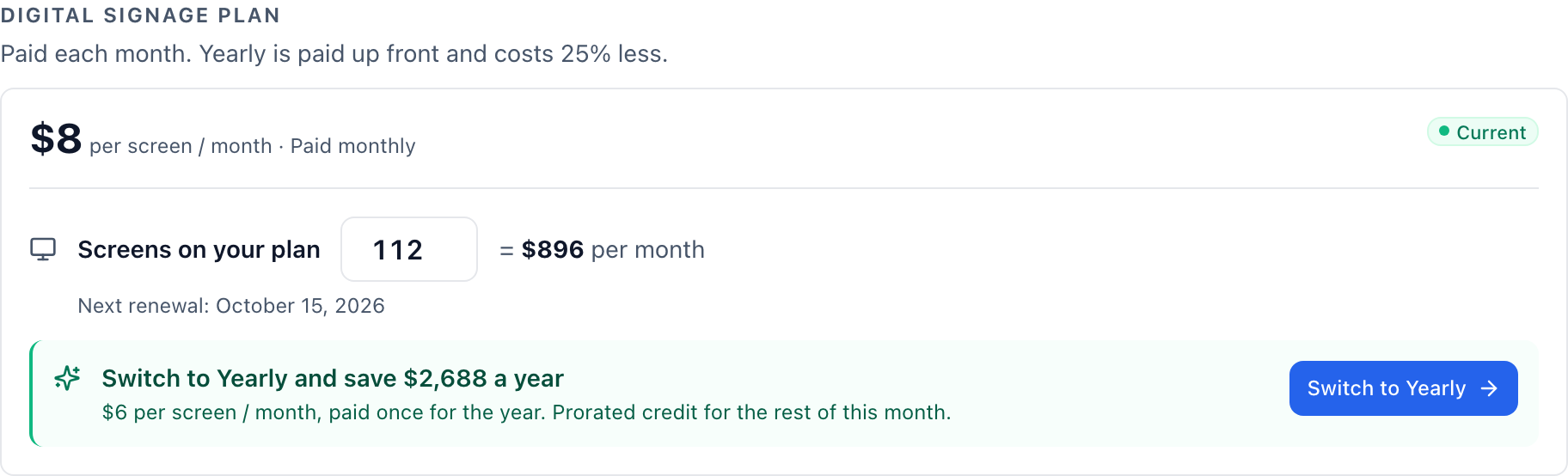
The screenshot above shows a real account on 112 screens, still on monthly billing. Switching that account to annual drops its rate from $8 to $6 per screen per month, the same 25% saving a 10-screen account gets. Screen count never enters the calculation.
Why Brix has no volume discount
A volume discount only pays for itself when the list price has room cut into it. Many vendors publish a higher "sticker" rate on their smallest tier, then negotiate it down for a bigger buyer. Brix prices one plan at one rate instead. The $6 annual rate is close to the number a bigger customer would have to negotiate down to elsewhere, so there is no padding left to discount out of it. A 500-screen rollout and a 10-screen pilot pay the same per-screen rate, and both get the same 25% saving by moving to annual billing.
This also means the price does not creep up as you add screens, which is the opposite problem to watch for. Some vendors gate features behind a higher tier that happens to need more screens to unlock, so growing the fleet can raise the per-screen rate instead of lowering it (see the next section). Brix's flat rate removes that risk: the 501st screen costs the same as the first.
For a large or multi-site rollout, a Brix team member can help with bulk Amazon Signage Stick sourcing, and Amazon provides free Signage Sticks for rollouts of 30 or more screens. That conversation is about logistics, not about negotiating the per-screen price, because the price does not move.
What a "volume discount" quote usually hides
Checked against vendor pricing pages, dated, from Brix's own competitor price research:
- A minimum screen count for the discounted tier. OptiSigns' Enterprise tier needs at least 25 screens, at $45 per screen per month monthly or $40.50 annually. Screenly's Business tier starts at 5 screens and its Enterprise tier at 25, yearly billing only. Carousel Digital Signage needs 10 players for its Core tier and 30 for its Pro tier. Ask what the minimum is before you compare a quoted per-screen rate with Brix's flat rate: a quote below the minimum does not apply to you.
- A tier that costs more per screen, not less, as you grow. OptiSigns' Enterprise rate ($45/screen monthly) is more than four times its Standard rate ($10/screen monthly). Rise Vision's Enterprise tier runs $15/display/month against $11 on Basic (annual). That jump buys features the lower tier lacks. It is not a volume saving, and a quote that frames it as one is comparing the wrong two numbers.
- A rate that only exists on an annual commitment. Rise Vision's Advanced and Enterprise tiers show a per-year price with no monthly option. Screenly's Enterprise tier is "yearly plan only". TelemetryTV's Elite tier is annual-term only and needs 10 devices minimum. A lower rate that requires a year's commitment is a billing-term discount, not a volume discount. Ask if the same rate exists month to month; if it does not, you are not comparing like for like.
- No public number at all. ScreenCloud's Enterprise tier, Kitcast's Enterprise tier, Carousel's Enterprise tier and several other vendors publish no price and route you to "contact sales". A custom quote can bundle a setup fee, a minimum contract length or a professional-services charge into one number. Ask for the per-screen software rate and every other line item separately, so you can see what moved the total.
How to check any vendor's volume quote
- Ask for the per-screen rate at your exact screen count, in writing, not a range.
- Ask what the minimum screen count is for that rate, and what the rate is one screen below it.
- Ask whether the rate needs an annual commitment, and what the same screen count costs month to month.
- Ask for setup fees, onboarding fees and hardware costs as separate line items, not folded into "per screen."
- Multiply the quoted per-screen rate by your screen count and compare that monthly total against Brix's flat rate at the same count, from the table above.
Running a formal procurement process for a larger rollout? A digital signage RFP template has a line for the per-screen rate at your exact screen count, so a vendor cannot answer with a range.
FAQ
Does Brix offer a discount for buying a large number of screens at once?
No. Every screen on a Brix plan costs the same $6 per screen per month billed annually, or $8 billed monthly, whether the account runs 10 screens or 500.
Is billing annually instead of monthly a volume discount?
No, it is a billing-term discount. It applies at any screen count, including a single screen, and saves 25% per screen over monthly billing.
Do any competitors publish a real bulk discount that falls as screen count rises?
Of the vendors in Brix's pricing research, none publish a rate card where the same tier's per-screen price falls as screen count rises inside that tier. Discounts tie to annual billing or to moving into a higher tier that adds features, not to adding more screens on the same tier.
How does the per-screen price compare with the total cost of running digital signage?
The per-screen software rate is only one line item. Hardware, mounting and content time add to the total; see what digital signage really costs per screen for the full breakdown.
What should I ask for before I accept a custom quote for a large rollout?
Ask for the per-screen software rate, the minimum screen count it applies to, whether it needs an annual commitment, and every setup or hardware fee as its own line item. Multiply the per-screen rate by your screen count yourself rather than accepting a single bundled total.
Run the numbers above against any quote you receive, then start a 7-day free trial to check Brix's flat rate against your own screen count. No card is needed.