Yodeck, piSignage and Play Digital Signage each publish a free plan that runs on the Amazon Signage Stick (some people just call it the Fire Stick). OptiSigns and DigitalSignage.com also publish a free plan, but neither confirms it works on the Stick.
A free CMS plan only covers the software. The Amazon Signage Stick itself costs $99.99 on its own.
If you want to test the Stick itself while you compare CMS options, Brix gives a 7-day trial with no card.
Which free CMS plans actually run on the Signage Stick?
| CMS | Free plan | Runs on the Signage Stick? |
|---|---|---|
| Yodeck | One screen, free forever, no card | Yes. Yodeck comes pre-installed on the Stick. |
| piSignage | Two player licenses, free forever | Yes. Pick piSignage from the Stick's own CMS list during setup. |
| Play Digital Signage | One screen free, no card, if you leave a review within 30 days | Yes. Amazon lists it in the Signage Stick CMS partner directory. |
| OptiSigns | Up to 3 screens, 1 GB storage, OptiSigns logo on screen | No. Its Free plan allows only OptiSigns devices, Windows, Linux and Raspberry Pi. |
| DigitalSignage.com | Up to 3 screens, 1 GB storage, no card, no time limit | Not confirmed. It is not in Amazon's partner directory, and its player page names Android TV, not Fire OS. |
Amazon keeps its own CMS partner directory for the Signage Stick, with 86 listed partners, including Yodeck, OptiSigns, piSignage and Play Digital Signage. Being on that list only means the CMS runs on the Stick at all, usually on a paid plan. It does not mean the Free plan does. OptiSigns is the clearest case: it is a partner, and its paid plans run on the Stick, but its own pricing page restricts the Free plan to other devices.
What Yodeck, piSignage and Play Digital Signage give you free
Yodeck
- Free plan: one screen, forever, no card. Unlimited file storage, subject to a fair use policy.
- Watch out for: paid accounts get support first. Offline playback lasts up to 35 days across Yodeck's plans, including Free, if the Stick loses its network.
piSignage
- Free plan: two player licenses, forever. No stated watermark.
- Watch out for: a third player costs $35 in its first year (about $3 a month billed annually), then $20 a year after that.
Play Digital Signage
- Free plan: one screen, no card, no watermark.
- Watch out for: it stays free only if you leave a review within 30 days and confirm it in live chat. Miss that step, and the screen moves to a paid plan. A second screen bills on Essential, Pro or Ultimate, and the per-screen price drops from the sixth screen on.
Why OptiSigns and DigitalSignage.com do not count here
Both publish a free plan. Neither confirms it runs on the Amazon Signage Stick, because the Stick runs Fire OS, and the Stick is not on either vendor's own list of supported free-plan devices.
OptiSigns
- Free plan: up to 3 screens, 25 basic apps, 1 GB storage.
- Watch out for: the OptiSigns logo shows on every screen, and the plan's own terms allow only OptiSigns devices, Windows, Linux and Raspberry Pi. The Signage Stick is not on that list.
DigitalSignage.com
- Free plan: up to 3 screens, 1 GB storage, no ads, no time limit, about 90 percent of the paid feature set.
- Watch out for: its player page lists Windows, Mac, Linux, Android TV and Chrome OS. Fire OS, the system behind the Signage Stick, is not named, and DigitalSignage.com is not in Amazon's CMS partner directory. Removing its branding needs the Enterprise plan.
What you pay once you outgrow the free plan
Every vendor here prices by the screen, and every one costs more as you add tiers for extra features such as remote reboot or proof of play.
- Yodeck: Basic $8 a screen a month, Premium $12, Enterprise $16. The same rate applies billed monthly or annually.
- piSignage: $20 a year per player from the second year (about $1.67 a month), after $35 in the first year for a new player.
- Play Digital Signage: Essential $7.20 a screen a month billed annually ($8 monthly), Pro $10.80 ($12), Ultimate $14.40 ($16).
- OptiSigns: Standard $9 a screen a month billed annually ($10 monthly). Remote reboot and screenshots need Pro Plus, $13.50 annually ($15 monthly). Engage is $27 annually ($30 monthly).
- DigitalSignage.com: mediaCLOUD+ is $3 a screen a month.
Where Brix fits
Brix has no free plan. It gives a 7-day trial, no card, then $6 per screen per month billed annually, or $8 billed monthly.
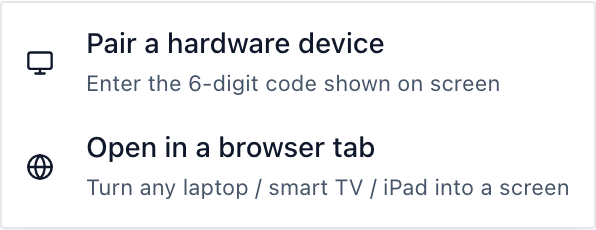
Setup takes about 10 minutes. During the Stick's own on-screen setup, pick "Brix Signage." Then pair it in the CMS: Screens > Add screen > Pair a hardware device.
Moving from a free plan you have outgrown: Brix moves your content, playlists and screens for you, free, usually in a day.
If you run one screen and will never add a second, a permanent free plan such as Yodeck or piSignage costs nothing, and Brix cannot beat that. Brix earns its price past one screen: schedules, roles for more than one person, and remote control of the whole fleet from one screen.
A new Brix screen defaults to Standard hours, 6:00 am to 11:00 pm, and turns the TV off outside those hours over HDMI-CEC. For a screen that runs around the clock, set it to Always on instead.
Start a 7-day Brix trial, no card, and move your content over free if you decide to switch.
FAQ
Is there a free CMS for the Amazon Signage Stick?
Yes. Yodeck and piSignage both have a free plan that works on the Stick forever. Play Digital Signage gives one free screen if you leave a review within 30 days.
Does OptiSigns have a free plan for the Signage Stick?
No. OptiSigns' Free plan runs only on OptiSigns devices, Windows, Linux and Raspberry Pi. The Signage Stick and other Fire TV devices are not on that list.
Does Brix have a free plan?
No. Brix gives a 7-day trial with no card, then charges $6 per screen per month billed annually, or $8 billed monthly.
Can I move from a free CMS to Brix without losing my content?
Yes. Brix moves your content, playlists and screens for you, free, usually in a day.
Does being on Amazon's CMS partner list mean the free plan works on the Stick?
No. The list only confirms the CMS runs on the Stick on some plan, usually paid. Check the vendor's own Free plan terms for a device restriction.
Related: see all 12 CMSs compared for the Amazon Signage Stick, how Amazon gives Signage Sticks free for 30+ screen rollouts, the Amazon Signage Stick setup guide, and the Amazon Signage Stick product page.