The best CMS for the Amazon Signage Stick uses Amazon's own Remote Management API, so you can reboot the Stick, see its screen, turn the TV off at night and change its Wi-Fi from the dashboard. It should also keep playing when the internet drops, at a price per screen you can live with.
Of the 12 below, Brix and Play Digital Signage do all four on the Stick. Yodeck, Rise Vision, ScreenCloud and Xibo do three. Yodeck is the best free start (one screen, free forever), and AbleSign is free for any number of screens but has none of the remote controls in its docs.
The 12 compared: price, trial, offline
Prices are per screen per month, annual billing first. Read from each vendor's pricing page, September 2026.
| CMS | Price per screen | Free plan or trial | Plays offline |
|---|---|---|---|
| Brix | $6 billed annually, or $8 monthly | 7-day trial, no card | Yes. Cache up to half the Stick's storage |
| AbleSign | Free | Free plan, no screen limit | Yes |
| Juuno | $5 (monthly only) | 7-day trial, no card | No (not in its docs) |
| PosterBooking | Free up to 10 screens, then $6.49 | 10 screens free for 3 months, with a watermark | Yes |
| Play Digital Signage | From $7.20 billed annually, or $8 monthly | First screen free, no card | Yes |
| Yodeck | $8 | 1 screen free forever; 30-day trial, up to 5 screens | Yes, up to 35 days |
| OptiSigns | $9 billed annually, or $10 monthly | 14-day trial, no card. Free plan does not run on the Stick | Yes |
| Rise Vision | $11 billed annually ($132 a year), or $12 monthly | 14-day trial, no card | Yes |
| NoviSign | $14 billed annually, or $16 monthly | 30-day trial | Yes. Web, YouTube and streams need internet |
| Fugo | $20 billed annually, or $24 monthly | 14-day trial, no card; 1 screen free with a watermark | Yes |
| ScreenCloud | $20 billed annually, or $24 monthly | 14-day trial, no card, up to 5 screens | Yes. Streams are skipped |
| Xibo | £3.50 a display, monthly or annually (GBP only) | 14-day trial, no card, 2 screens | Yes. Downloads 2 days ahead by default |
The 12 compared: control of the Stick
"Amazon's API" is the "Remote Management" label in Amazon's CMS directory. The other columns say whether the vendor's own docs show the control working on the Signage Stick, not only on its own hardware.
| CMS | Amazon's API | Reboot | Live screenshot | TV on/off (HDMI-CEC) | Change Wi-Fi |
|---|---|---|---|---|---|
| Brix | Yes | Yes | Yes, video included | Yes, on a schedule | Yes |
| AbleSign | Yes | No | No | Blank screen off-hours | No |
| Juuno | No | Yes (devices not named) | No | Raspberry Pi only | No |
| PosterBooking | No | Paid add-on | Yes | No | No |
| Play Digital Signage | Yes | Yes | Yes, Pro plan and up | Yes, Pro plan and up | Yes |
| Yodeck | Yes | Yes | Yes | Yes, on a schedule | No |
| OptiSigns | No | No (OptiSigns players only) | No (OptiSigns players only) | No (OptiSigns players only) | No |
| Rise Vision | Yes | Yes | Yes | Yes, on a schedule | No |
| NoviSign | Yes | Yes, Business Plus plan and up | No | No (mute only) | No |
| Fugo | No | App restart only | Yes | Blank screen off-hours | No |
| ScreenCloud | Yes | Yes | Yes | On/off by hand; no schedule on the Stick | No |
| Xibo | Yes | Yes | Yes | Yes, on a schedule | No |
"No" means we found no sign of it on the vendor's pricing page, feature pages, help centre or Signage Stick guide.
Why Amazon's Remote Management API matters
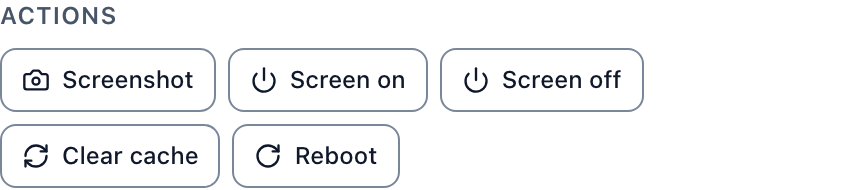
Amazon builds a device agent into every Signage Stick and lets only approved CMS apps use it. Through it, a CMS can reboot the Stick, capture the real picture on the TV, switch the TV on and off over HDMI-CEC, rotate the whole display and add a Wi-Fi network.
A CMS without it runs as an ordinary app. Amazon's own FAQ says that without the API, "scheduled power commands won't reach the TV". Its screenshots show video as a black box, and a reboot means Amazon's separate portal or a visit.
The label alone is not the whole answer. AbleSign carries it, but its docs show no reboot or screenshot. NoviSign carries it, but documents no screenshot or TV power on the Stick. Test each control in the trial. See Amazon Signage Stick remote management, explained for what the API does and a 5-minute trial checklist.
Each CMS on the Signage Stick
Brix
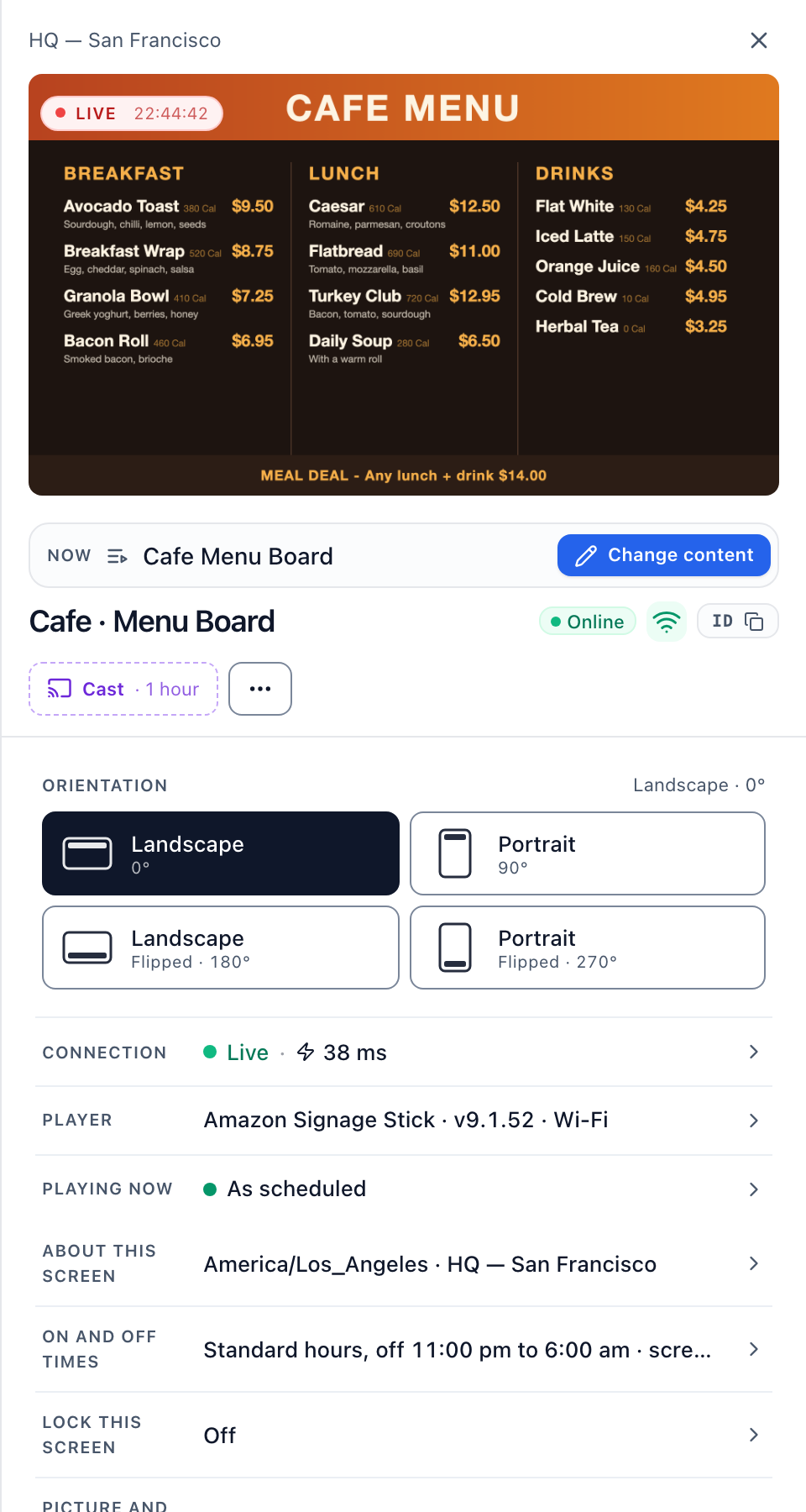
- Price: $6 per screen per month billed annually, or $8 billed monthly. Every feature on one plan.
- Best for: businesses with screens at several sites that want to fix a screen without a visit.
- On the Stick: reboot, live screenshot with video, TV off outside Screen hours, Wi-Fi and time zone changes, portrait with video turned too. All through Amazon's API.
- Watch out for: no free plan, a 7-day trial. No synced video wall, no SAML (OIDC single sign-on only).
AbleSign
- Price: free, no per-screen charge. 100 GB storage is a paid add-on.
- Best for: a few screens on no budget.
- On the Stick: plays offline, portrait from the dashboard, proof of play.
- Watch out for: no remote reboot, screenshot or TV power in its docs, despite Amazon's label.
Juuno
- Price: $5 a screen on the Business plan, monthly only. Proof of play is on Growth, $9.
- Best for: the lowest paid price for a small fleet.
- On the Stick: remote restart is on its feature page, devices not named. TV power is documented for the Raspberry Pi only.
- Watch out for: no offline playback claim and no Remote Management label.
PosterBooking
- Price: free for up to 10 screens with a watermark, then $6.49 a screen.
- Best for: trying signage on up to 10 screens.
- On the Stick: plays offline, screenshot on request.
- Watch out for: remote reboot is a paid add-on. No TV power control. No Remote Management label.
Play Digital Signage
- Price: Essential $8, Pro $12, Ultimate $16 a screen monthly, about 10% less billed annually.
- Best for: full Stick control at a mid-range price.
- On the Stick: reboot, screenshot, TV on/off and batch Wi-Fi changes through Amazon's API.
- Watch out for: screenshots and TV on/off need Pro ($12). Proof of play is on Ultimate ($16). The free screen comes with a request for a review.
Yodeck
- Price: Basic $8, Premium $12, Enterprise $16 a screen, the same billed monthly or annually.
- Best for: one free screen, and long offline stretches (up to 35 days).
- On the Stick: reboot, screenshot and a TV off schedule through Amazon's API.
- Watch out for: network, Wi-Fi and time zone cannot be set from Yodeck on the Stick. Proof of play is on Premium ($12).
OptiSigns
- Price: Standard $9 billed annually, or $10 monthly. Remote control and proof of play are on Pro Plus, $13.50 annually or $15 monthly.
- Best for: a large app library, on OptiSigns' own players.
- On the Stick: plays offline, portrait from the dashboard.
- Watch out for: reboot, screenshot, TV power and Wi-Fi need an OptiSigns player, not the Stick. Its free plan does not run on Amazon devices.
Rise Vision
- Price: $132 a display a year ($11 a month), or $12 monthly. Schools pay $119 a year.
- Best for: K-12 schools.
- On the Stick: reboot, live screenshot, TV on/off schedule over HDMI-CEC, portrait.
- Watch out for: Wi-Fi is set at the Stick. No proof-of-play reports in its docs.
NoviSign
- Price: Business $14 billed annually, or $16 monthly. Business Plus $17 or $19.
- Best for: a long 30-day trial before you pay.
- On the Stick: restart and mute through Amazon's API, on Business Plus.
- Watch out for: no screenshot or TV power on the Stick in its docs. Web, YouTube and streaming widgets stop offline.
Fugo
- Price: Essential $20 billed annually, or $24 monthly. Core $30 or $36.
- Best for: one free screen with no time limit, if a watermark is fine.
- On the Stick: plays offline, live screenshot, restart of the Fugo app.
- Watch out for: no Remote Management label. Its power schedule blanks the picture; it does not turn the TV off.
ScreenCloud
- Price: Core $20 billed annually, or $24 monthly. Pro $30 or $36.
- Best for: internal communications in offices.
- On the Stick: reboot, app restart, live screenshot, TV on/off by hand, through Amazon's API.
- Watch out for: the TV power schedule and Wi-Fi settings work only on ScreenCloud's own hardware. Proof of play is a Pro add-on.
Xibo
- Price: hosted plans £3.50, £5.50 or £9.00 a display a month, priced in GBP only.
- Best for: technical teams, and open-source fans who may self-host later.
- On the Stick: reboot, screenshot, mute and screen on/off by hand or on a schedule, through Amazon's API.
- Watch out for: no Wi-Fi change from the CMS. Off a Xibo plan, each Stick needs a paid player licence.
Does it keep playing when the Stick loses Wi-Fi?
Every CMS above except Juuno says it plays cached content offline. Amazon's FAQ says the same of the Stick: playback continues, but changes and updates wait for the connection.
The differences are in what does not survive:
- Live web content. NoviSign stops web, YouTube and streaming widgets. ScreenCloud skips streams.
- How long. Only Yodeck gives a number: up to 35 days.
- How much. Brix's cache can use up to half the Stick's storage, never less than 1 GB.
On Brix, live apps such as RSS feeds and dashboards show their last hourly snapshot when the Stick is offline, instead of an error. With proof of play on, play records are kept on the Stick and sent when it reconnects. See Amazon Signage Stick offline playback.
How setup works with any CMS
- During the Stick's on-screen setup, or in Amazon's Signage Manager, you pick a CMS from Amazon's list. Amazon installs its app.
- You pair the Stick in that CMS. On Brix: Screens, Add screen, Pair a hardware device. Setup takes about 10 minutes in all, most of it Amazon's setup and app install. In Brix's own fleet, the pairing step takes a median of 2.6 minutes, from the code appearing on the TV to the screen showing up in Brix.
- To switch CMS later, Amazon says to factory reset the Stick and set it up again. See how to change the CMS on an Amazon Signage Stick.
When Brix is not the right choice
- You need it free. Yodeck's free screen, AbleSign or PosterBooking's 10 free screens cost nothing; Brix is a 7-day trial.
- You need a synced video wall. Use players built for walls. See the Amazon Signage Stick for a video wall.
- You need SAML single sign-on or a SOC 2 report. Brix offers OIDC sign-on and has no SOC 2 report.
FAQ
Is there a free CMS for the Amazon Signage Stick?
Yes. AbleSign has no per-screen charge. PosterBooking is free for 10 screens with a watermark. Yodeck is free for one screen. OptiSigns' free plan does not run on the Stick.
Which CMS is on the Stick out of the box?
None until you choose. During setup the Stick asks you to pick a CMS from Amazon's list, then opens that app every time it starts. Brix is listed as "Brix Signage".
Can I use a CMS that is not in Amazon's list?
Not without developer steps. The Stick installs CMS apps from Amazon's list, and only approved apps can use Amazon's Remote Management API.
How much does the Stick cost on top of the CMS?
$99.99. See Amazon Signage Stick price for the first-year cost per screen with a CMS added.
Start a 7-day Brix trial on your Amazon Signage Stick. No card needed.