Buy the $99.99 Amazon Signage Stick with Brix if you want a low-cost, purpose-built device with a simple setup. Buy the Yodeck Player if you already run Yodeck and want its Raspberry Pi hardware bundled into an annual plan. The two run on different hardware and different software, so the real choice is cost over time and how hard it is to change your mind later.
Compare them at a glance
| Amazon Signage Stick (with Brix) | Yodeck Player | |
|---|---|---|
| Hardware cost | $99.99, one time | $85 (1 GB) or $155 (4 GB), one time, free on an annual Yodeck plan |
| Software cost | $6 per screen per month billed annually | $8 per screen per month billed annually (Basic plan) |
| Setup time | About 10 minutes | Not published; the player ships ready to plug in |
| Switching effort | Factory reset, about 10 minutes, then pick the new CMS | No in-menu switch; the player only runs Yodeck |
Try Brix on the Signage Stick free for 7 days. No card needed.
What do they actually cost?
The Amazon Signage Stick costs $99.99, one time, from Amazon. Brix software for the Stick costs $6 per screen per month billed annually. A 7-day free trial needs no card.
Over one year, one Stick with Brix costs $171.99 billed annually: $99.99 for hardware plus $72 for software.
Yodeck's Basic plan costs $8 per screen per month billed annually. An annual Basic plan includes a 1 GB Yodeck Player free. Buy the player outright instead and it costs $85 (1 GB) or $155 (4 GB, the model bundled with Premium and Enterprise). Yodeck's Premium plan is $12 per screen per month billed annually and Enterprise is $16, both having risen by $1 per screen per month since April 1, 2026 (Basic unchanged), per Yodeck's own documentation.
Over one year on Yodeck Basic with the free annual player, the total is $96: no separate hardware line, because the player comes with the plan. Buy the Yodeck Player outright instead and the first year costs $181.
The gap narrows once you count a Yodeck Player bought outright, but Brix's annual plan still costs less in year one and every year after.
What is inside the box behind the TV
The Amazon Signage Stick runs Fire OS, the same operating system family as a consumer Fire TV, but built for business use: kiosk mode and auto-launch into the signage app, so it needs no attention after setup. Brix installs from the Amazon Appstore and starts in about 10 minutes.
The Yodeck Player is a Raspberry Pi 4 Model B with a 32 GB SD card (about 28 GB usable), according to Yodeck's own player documentation. Yodeck's own troubleshooting guide lays out a four-stage boot sequence: about 3 seconds of chip boot, 2 seconds of firmware boot, 3 seconds where the player checks for a USB drive to reflash from, then 3 to 15 seconds for the boot logo and loading screen. After that, the guide says playback from a stored schedule is confirmed only after 2 minutes, and a software update "typically" takes 2 to 30 minutes, with anything past 1 to 2 hours flagged as needing remote help.
Yodeck's own documentation says the newer Raspberry Pi 5 runs Yodeck, but "a few features perform differently than on the Raspberry Pi 4": layouts with several dynamic zones "play slowly and can lag," and color depth is "fixed at 16-bit and can't be changed yet." The same page calls the Pi 4 "still our recommended Yodeck Player," with "the best balance of performance, reliability and cost." The gap traces back to the board itself: Yodeck's 2024 engineering post says the Pi 5 removed the hardware H.264 decoder Yodeck relies on, and dropped the DispmanX API Yodeck used for smooth ticker overlays.
That is the real trade-off: the Stick is a sealed consumer-electronics device Amazon updates behind the scenes. The Yodeck Player is a general-purpose single-board computer with an SD card, a visible multi-stage boot, and a software stack that has to keep working around changes to the board under it.
What switching actually costs you
Changing the CMS on an Amazon Signage Stick happens through a factory reset, not a menu option. Expect:
- About 10 minutes per stick for the reset and setup, plus 10 minutes or more if it installs an update.
- No content carries over automatically. Playlists, schedules and the screen's name stay in the old CMS. Brix rebuilds your playlists and schedules for you, free, usually in a day, as part of moving to Brix.
- Re-pairing takes minutes, not hours. In Brix's own fleet, pairing a Signage Stick takes a median of 2.6 minutes from the code appearing on the TV to the screen showing up in the CMS.
- The old subscription does not cancel itself. Removing a stick from a CMS does not end that vendor's billing; cancel or reduce the license count separately.
Leaving the Yodeck Player for the Signage Stick costs more than software setup, because it is also a hardware swap: the Yodeck Player only runs Yodeck, so you cannot repoint it at Brix. You buy a $99.99 Stick and start again. Moving the other way, from the Stick to Yodeck, also needs new hardware if you want the bundled Yodeck Player, though Yodeck's own pricing page offers switchers 15 hours of free transition support toward that move (yodeck.com).
Where Brix fits
Brix is one of the CMS partners in the Amazon Signage Stick's own setup list, listed as Brix Signage. During the Stick's on-screen setup, pick Brix Signage, then pair it in the CMS: go to Screens, select Add screen, then Pair a hardware device, and type the code the Stick shows.
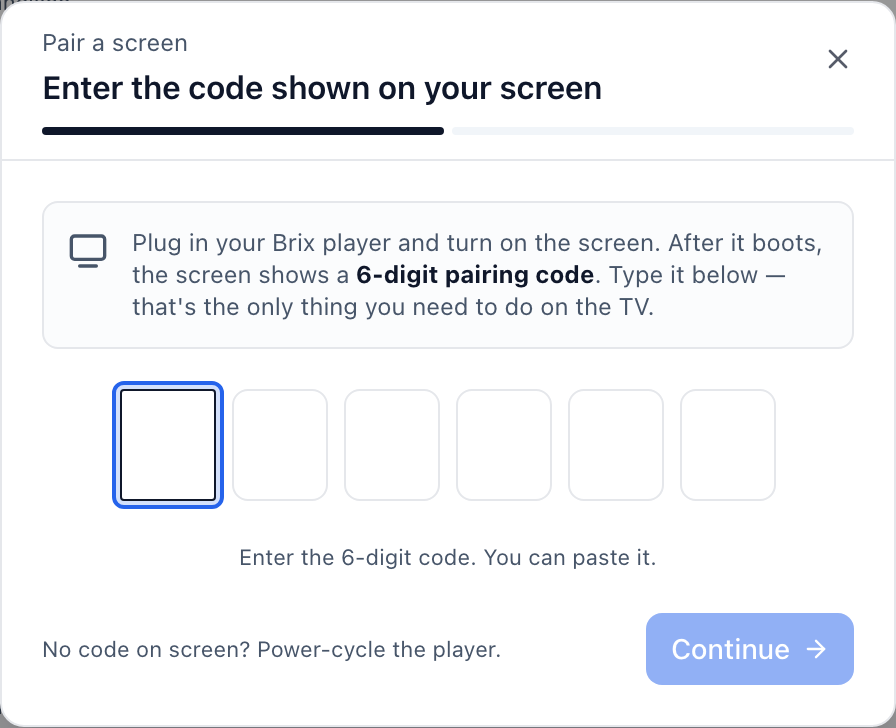
Brix supports the Amazon Signage Stick, Fire TV, Android boxes such as the Walmart onn, TVs with Google TV or Android TV built in, and the Windows player. Brix does not run on a Raspberry Pi, so a Yodeck Player cannot be repurposed for Brix; a new Signage Stick is the way in. See Brix for the Amazon Signage Stick for the full feature list.
For a rollout of 30 screens or more, Amazon provides the Sticks free of charge, and Brix arranges this with Amazon: talk to us.
When the Yodeck Player is the better buy
If you already run Yodeck across a fleet, stay on the hardware it recommends. Yodeck's own documentation still names the Pi 4 player as the best balance of performance, reliability and cost, ahead of the newer Pi 5. The safest move inside Yodeck is the same player model you already have, not a new board generation. Switching software and hardware at once, without a reason to leave, adds cost for no gain.
Where the Signage Stick is the better buy
If you are starting fresh, adding a handful of screens, or want one sealed device with no SD card to manage, the Signage Stick with Brix costs less in year one and keeps setup to about 10 minutes. It fits a single screen or a handful of them in a store, office or restaurant; it is not built for a video wall or synced multi-screen displays. Compare it against purpose-built AV hardware in Amazon Signage Stick vs BrightSign, or against a bare board you set up yourself in Raspberry Pi vs Amazon Signage Stick.
FAQ
Can I run Brix on a Yodeck Player?
No. The Yodeck Player is a Raspberry Pi running Yodeck's own software image. Brix does not support Raspberry Pi hardware; it runs on the Amazon Signage Stick, Fire TV, Android boxes, Google TV and Android TV sets, and the Windows player.
Can I run Yodeck on an Amazon Signage Stick?
Yodeck's own site lists the Amazon Signage Stick and Fire TV Stick as supported hardware for its software. You can run either vendor's software on the Stick; only Yodeck's own Pi-based player is locked to Yodeck.
Does switching the Stick's CMS affect my Amazon account?
No. Your Amazon Signage account stays as it is. The Stick leaves it during the factory reset and returns automatically once you pick a new CMS in setup.
Does Yodeck help with switching?
Yodeck's pricing page offers switchers 15 hours of free transition support toward moving into Yodeck. Brix offers free migration the other way: moving your content, playlists and screens to Brix, usually in a day.
Is the Raspberry Pi 5 version of the Yodeck Player worth buying?
Not as the first choice. Yodeck's own documentation still recommends the Pi 4 player for "the best balance of performance, reliability and cost." The Pi 5 version runs Yodeck, but layouts with several dynamic zones "play slowly and can lag," and color depth stays fixed at 16-bit.
Try Brix on the Signage Stick free for 7 days. No card needed.