A three-TV digital menu board is three separate screens, not one picture split in software. In Brix, you pair three screens and give each one its own part of the menu, or the same menu timed to switch together. Group the three screens so you can change all of them at once. Start a free trial to set up your first screen in about 10 minutes.
Do three TVs show one connected menu, or three separate screens?
Three separate screens. Brix does not stitch three TVs into one continuous image, so do not design a picture that is supposed to run edge to edge across them. Instead, give each TV a complete section of the menu: one TV for mains, one for combos and sides, one for drinks and specials. This is the classic counter board layout (the four ways to put a menu on a TV compares the single-screen options), and it also means one TV going offline does not take the whole menu down with it.
What menu board layout works for three TVs?
A menu board layout for a three-screen counter usually splits by category, not by column count on a single image. Two patterns cover most QSR and café counters:
- By category — mains on TV one, combos and sides on TV two, drinks and specials on TV three.
- By daypart — all three TVs show the same menu, and a schedule switches every screen from breakfast to lunch to late-night at the same times each day.
Buy the three TVs at the same time, from the same model line. Brix does not need matching hardware, but mismatched brightness and color between adjacent screens reads as a fault to a customer, even when the content is correct.
What happens if one of the three TVs goes offline?
The screen keeps showing its last downloaded content. A Brix screen caches what it needs to play, so a dropped network connection does not blank the TV or freeze it on an error message. The customer still sees a menu, but not the newest one. Turn on offline alerts (email, webhook or Microsoft Teams) so staff hear about a dark or stuck TV from Brix, not from a customer standing at the counter.
How do you set up a 3 TV digital menu board in Brix?
- Pair the first screen. During the Signage Stick's own setup, pick "Brix Signage", then finish pairing it in the CMS: Screens > Add screen > Pair a hardware device.
- Repeat pairing for the second and third screens. Connect a screen covers the other ways to pair one, including a browser tab for a quick test.
- Build each screen's content: upload images or video, start from a Menu board template, or connect the Menu Board app to a spreadsheet, a file, an API or your point of sale.
- Create a screen group for the three TVs, so you can filter the Screens page to that group and select all three with one click.
- If every TV shows the same menu, use the group's bulk "Change content" action to push one playlist to all three. If each TV shows a different section, assign each screen its own playlist, and keep the group for what they share.
- Set opening hours once for all three. Select the group's screens and use Operating hours to apply the same hours to every selected TV, so the board turns off together outside trading hours.
Three ways to fill three menu screens
| Way to fill the screen | Who updates it | Good for |
|---|---|---|
| Upload images or video per TV | Whoever edits the playlist | A menu that rarely changes |
| Menu board template (Templates) | Whoever edits the design | A branded look, prices typed in by hand |
| Menu Board app (Sheet, CSV, JSON, API or point of sale) | The spreadsheet or POS, automatically | A menu with many items, or prices that change often |
The Menu Board app marks a sold-out item with its price struck through, instead of deleting the row. The app can also show FDA-style calorie labeling and a footnote line for a US chain menu.
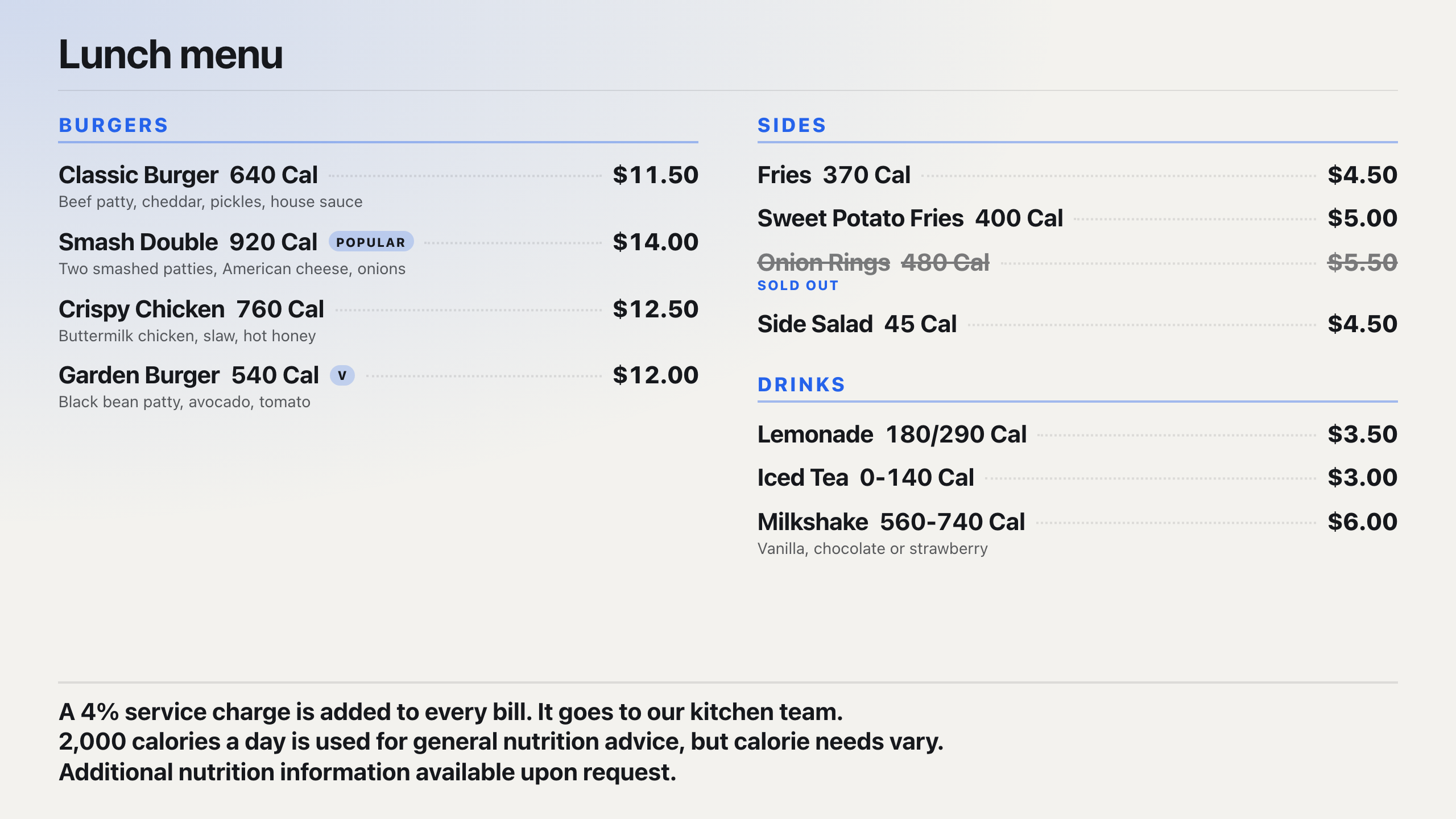
Brix connects to Toast, Square and Clover. Our team sets up the connection with you, and the same feed can drive the Menu Board app on all three screens, so a price change in the POS reaches every TV without anyone touching the CMS.
How fast do price changes reach all three screens?
Brix pushes a change to each screen over its live connection, and a screen that has lost that connection checks again every 30 seconds. The three TVs are not frame-locked to switch in the same instant, but a change you push to the group reaches every screen within moments of the others, not minutes.
What hardware works for a three-screen menu board?
Each of the three TVs needs its own player. Brix runs on the Amazon Signage Stick (the "Fire Stick" behind the TV), Fire TV, Android boxes such as the Walmart onn, a TV with Google TV or Android TV built in, and the Windows player. Only the Amazon builds (Signage Stick, Fire TV) can be managed remotely from Brix. An Android box or a built-in Google TV install from the Play Store can be paired and scheduled, but Brix cannot reboot it or manage it remotely the way it manages an Amazon device.
What does a 3 TV menu board cost?
Three Amazon Signage Sticks run about $300 total ($99.99 each), and every stick gets remote reboot and screenshots from the CMS. Three Walmart onn 4K Streaming Devices cost about $120 total (roughly $40 each), a cheaper way to get three screens running, without remote reboot. Brix itself is $6 per screen per month billed annually, or $8 per screen per month billed monthly, so three screens run $18 a month billed annually, or $24 a month billed monthly. The trial is 7 days, and no card is needed to start it.
FAQ
Can Brix stretch one picture across three TVs?
No. Each screen plays its own content. Pick a layout built as three panels, not one wide image you hope lines up across three separate displays.
Do the three TVs need to be the same model?
Brix does not require it, but matching models bought together keep color and brightness consistent, so the board reads as one sign instead of three mismatched screens.
How do you turn off all three TVs at closing?
Select the three screens, then use Operating hours in the bulk bar to set their hours once. "Standard hours" runs 6 am to 11 pm by default; set "Always on" if the board runs around the clock.
Can point-of-sale prices update all three TVs automatically?
Yes. Brix connects to Toast, Square and Clover, with our team setting up the connection, and that feed can drive the Menu Board app on every screen in the group.
Can you check how a TV's menu looks before it goes live?
Yes. Check content shows how a playlist or layout plays before it reaches the screen, so you catch a wrong price or a cut-off column on one of the three TVs before a customer does.
Start a free trial and pair your first menu board TV in about 10 minutes.