If your restaurant is part of a chain with 20 or more locations under the same name, the US calorie labeling rule applies to your digital menu boards the same way it applies to printed ones. Each standard item needs its calories next to its name or price, in type at least as large and as conspicuous, plus two set statements on the board. The rule is 21 CFR 101.11. This page walks through what it asks for on a screen, and the one extra rule California adds for children's meals.
This is a summary, not legal advice. Your local health department or the FDA has the final word.
Who does the calorie labeling rule cover?
The rule covers a restaurant or similar retail food business that is part of a chain with 20 or more locations doing business under the same name and offering substantially the same menu items. Franchises count the same as company-owned stores. A smaller business can register with the FDA to be covered voluntarily.
A single independent restaurant, or a group with fewer than 20 locations, is not required to post calories under this rule. Many choose to anyway.
Do digital menu boards count as menu boards?
Yes. The rule defines a menu or menu board as the primary writing a customer orders from, and lists "electronic menus" and "menus on the Internet" in that definition. It also says menu boards include drive-through boards. A TV behind the counter that shows your menu is a menu board.
What must a digital menu board show?
For each standard menu item:
- The number of calories, next to the item's name or its price.
- In type no smaller than the name or the price, whichever is smaller.
- In the same color, or one at least as conspicuous, as the item name, on a background at least as contrasting.
- The word "Calories" or "Cal", either next to each number or as a heading above a column of calorie numbers.
Rounding is fixed: to the nearest 5 calories up to and including 50, and to the nearest 10 above 50. Under 5 calories may be shown as 0.
The board also needs two statements, in type no smaller than the smallest calorie number on the board:
- "2,000 calories a day is used for general nutrition advice, but calorie needs vary."
- "Additional nutrition information available upon request."
On a menu board, the second statement goes at the bottom of the board, right above, below or beside the first.
A board aimed at children may use the children's statement the rule gives instead of, or as well as, the first one.
How do you show calories for combos and choices?
The rule has formats for items that change with the customer's choice:
- Two options, such as a small or large drink, use a slash: "150/250 calories".
- More than two options use a range: "100-250 calories".
- Combination meals, such as a sandwich, side and drink, follow the same slash or range formats when the parts vary.
Read the regulation text for the detailed cases, such as pizza by the slice or items with several toppings.
What is exempt?
The labeling requirements do not apply to foods that are not standard menu items:
- condiments for general use, on the table or at the counter;
- daily specials;
- temporary menu items, meaning items on the menu for less than a total of 60 days in a calendar year;
- custom orders;
- food in a customary market test, on the menu for less than 90 consecutive days.
Self-service food and food on display that is sold for less than 60 days a year, or for under 90 consecutive days as a market test, is also outside it. Otherwise, self-service food and food on display need calorie signs by the food.
The second statement is a promise: a covered restaurant must also have written nutrition information (fat, sodium, sugars, protein and more) for each standard item, ready to give on request.
What does California add for children's meals?
California's own 2008 calorie law was replaced by the federal rule, so there is no separate California calorie format. California does have a rule about drinks in children's meals.
Under Health and Safety Code sections 114379.10 to 114379.50 (SB 1192), the drink listed or shown on a restaurant menu or advertisement for a children's meal must be one of these (section 114379.20). A digital menu board is a menu, so it applies there too:
- water, sparkling water, or flavored water with no added sweeteners;
- unflavored milk;
- a non-dairy milk alternative with no more than 130 calories per serving.
A customer can still ask for a different drink. The rule is about what the board offers by default. A children's meal here means food and a drink sold together at one price, mainly for a child. The bill text has the full wording, and local environmental health departments enforce it.
How does Brix handle calories on a menu board?
The Brix Menu Board app reads a Calories column from a Google Sheet, a CSV or JSON file, or an API, next to your item names and prices. It has a setting called Calorie labeling with two choices:
- Off. Calories show as a small line under each item. This suits a restaurant that shows calories by choice.
- US chain (FDA). The board formats calories the way the FDA menu labeling rule describes. The figure sits right after the item name, in the same size and color as the name, with "Cal" after it. Figures are rounded to the nearest 5 up to 50 and to the nearest 10 above 50. The two statements show at the bottom of the board, never smaller than the calorie figures.
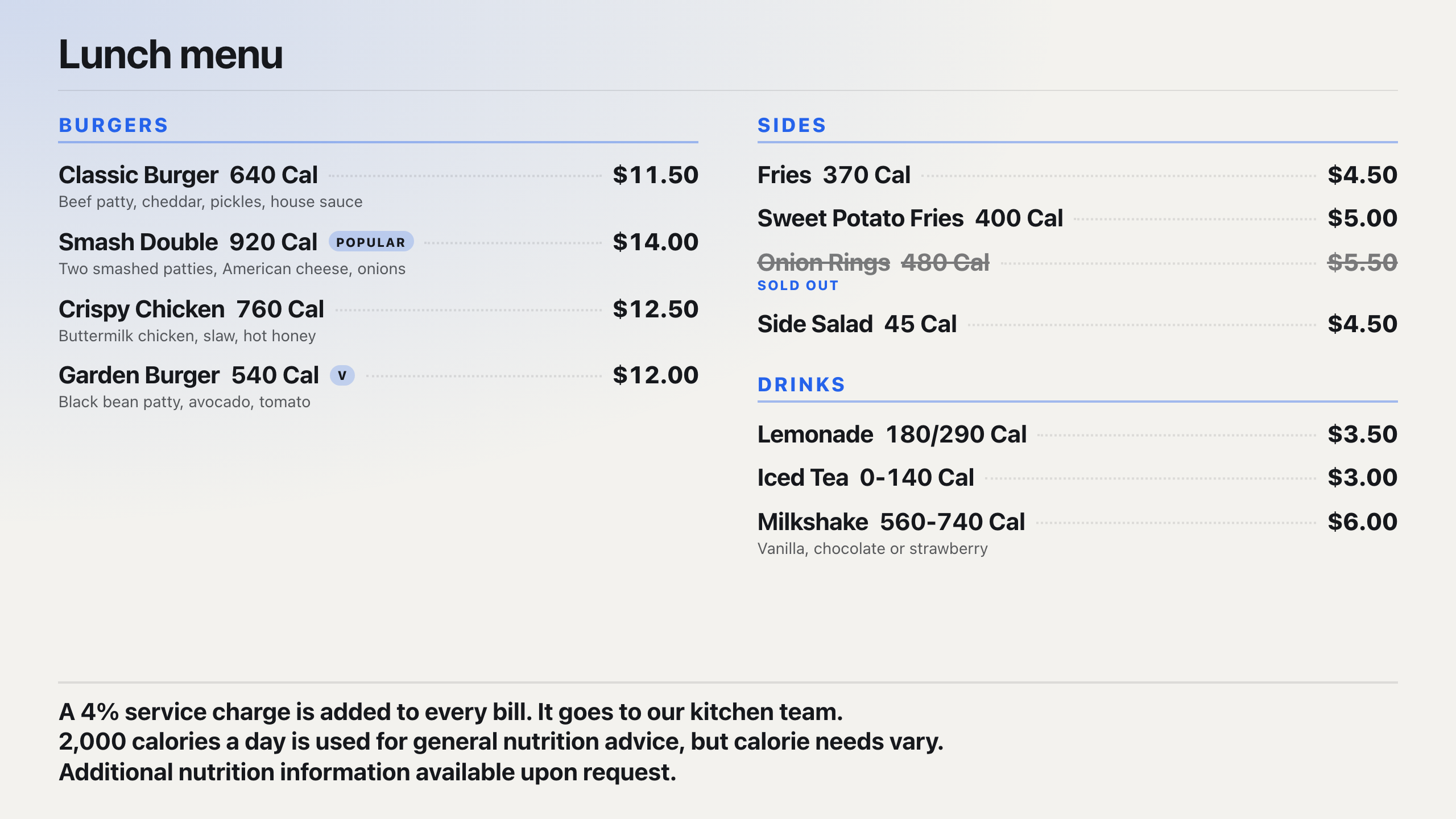
For combos and choices, type the range in the Calories cell. "350-500" shows as a range, and "350/450" shows two options with a slash. Items without a figure show none; the board never makes one up.
Rounding and layout are only part of the rule. Your calorie figures, and which items and exemptions apply, are yours to confirm. Check the finished board on the screen, and check with your counsel. See how to turn a TV into a digital menu board and digital signage for restaurants.
Brix costs $6 per screen per month billed annually, or $8 billed monthly, and runs on the Amazon Signage Stick and other players. Start a free 7-day trial, no card needed. For a chain rollout, talk to us.