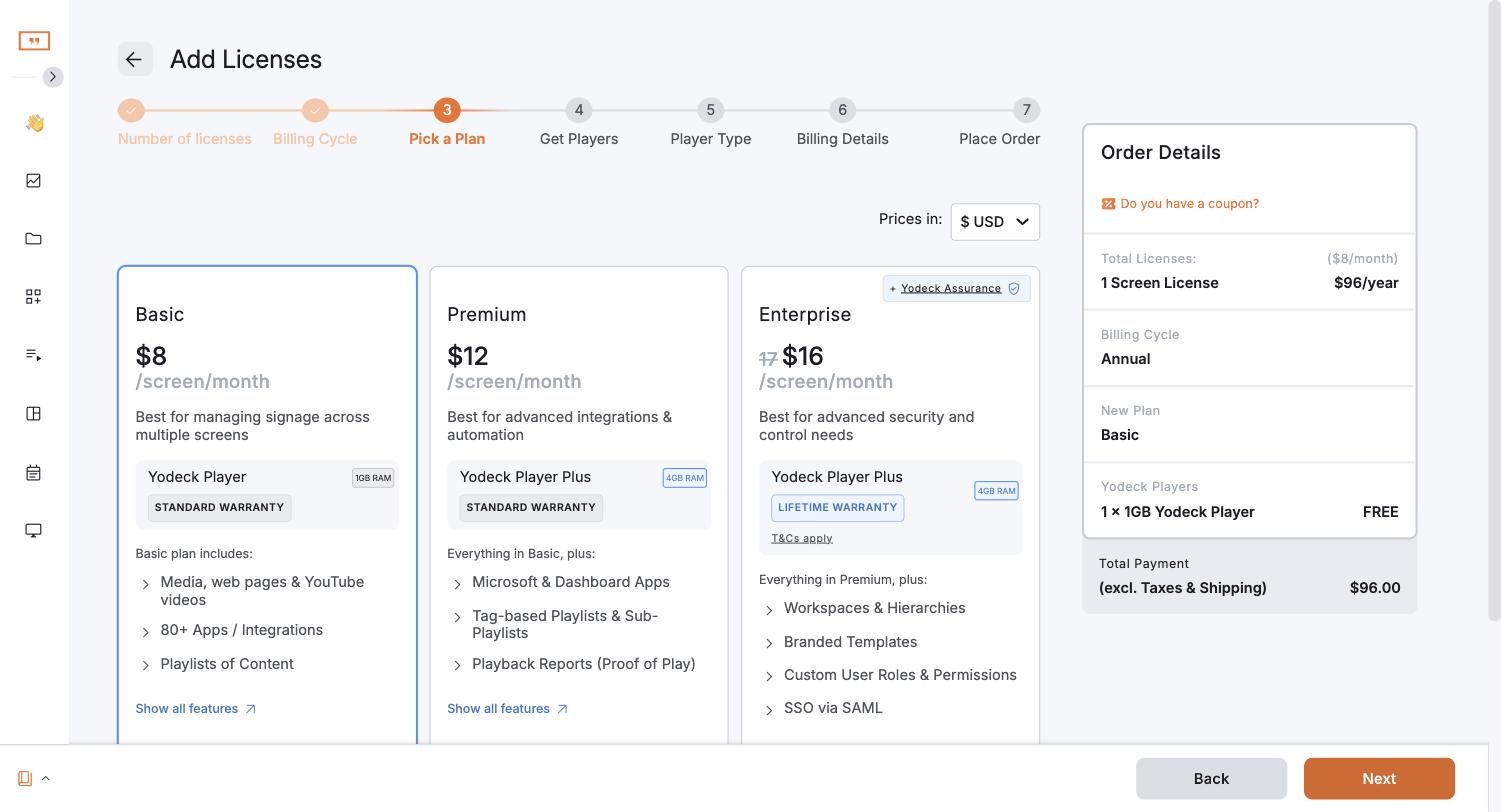
Yodeck costs $0 for 1 screen, then $8 (Basic), $12 (Premium) or $16 (Enterprise) per screen per month. Monthly and annual billing cost the same per screen, but annual plans include a free Yodeck Player. On April 1, 2026, Yodeck raised Premium and Enterprise by $1 per screen per month; Basic did not change (Yodeck's pricing update). Enterprise+ is priced by quote.
Yodeck pricing plans
From Yodeck's pricing page, in US dollars per screen per month:
| Plan | Price | Includes |
|---|---|---|
| Free | $0, 1 screen forever | All Basic features on a single screen, unlimited storage and users. No card. |
| Basic | $8 | All media types, 800+ templates, 90+ apps, drag-and-drop layout editor, interactive kiosk app, basic scheduling and playlists |
| Premium | $12 | Everything in Basic, plus Microsoft 365 and Google apps, data visualization apps, the Yodeck AI agent and API, advanced scheduling, tag-based playlists and sub-playlists, interactive library |
| Enterprise | $16 | Everything in Premium, plus workspaces and hierarchies, SAML single sign-on and data encryption, custom roles and permissions, branded templates, billing entities, Content Flows, 24/5 support, and a free lifetime warranty on Yodeck Players |
| Enterprise+ | Quote | Custom onboarding and training, a dedicated account manager, design consultation, 24/7 priority support, security assessment services |
Proof-of-play reports start on Premium. The audit log is on Enterprise.
Inside the app, the Enterprise price shows as $16 with $17 struck through.
How much do Yodeck players cost?
The Yodeck Player is a pre-configured Raspberry Pi. It costs $85 (1 GB) or $155 (Player Plus, 4 GB), or comes free with each screen on an annual plan: the 1 GB model on Basic, the 4 GB model on Premium and Enterprise. You can also run Yodeck on your own hardware: the Amazon Signage Stick, Fire TV, Samsung Tizen and LG webOS displays, BrightSign, Windows or your own Raspberry Pi.
What add-ons cost extra?
- Embeddable Feeds: from $6 per month, to show Yodeck content on websites or send it to remote teams.
- Yodeck Assurance: $1 per Yodeck Player per month, for fast replacement and hardware cover. Enterprise includes a lifetime warranty.
What changed in the Yodeck price increase?
From Yodeck's pricing update FAQ:
- How much: $1 per screen per month on Premium and Enterprise, on monthly and annual subscriptions.
- When: April 1, 2026.
- Basic: unchanged at $8.
- Monthly plans: the new price applied from April 1, 2026, unless you moved to an annual plan before that date.
- Other questions (annual renewals, screens added after April 1, multi-year contracts, negotiated discounts, other currencies): Yodeck asks you to contact your account manager or [email protected].
What does Yodeck cost at your screen count?
Per year, with the same price monthly or annually:
| Screens | Basic ($8) | Premium ($12) | Enterprise ($16) |
|---|---|---|---|
| 1 | Free | $144 | $192 |
| 5 | $480 | $720 | $960 |
| 10 | $960 | $1,440 | $1,920 |
| 25 | $2,400 | $3,600 | $4,800 |
| 50 | $4,800 | $7,200 | $9,600 |
The $1 rise adds $12 per screen per year: $60 a year on 5 Premium screens, $600 a year on 50.
How to pay less for Yodeck
- Check if you need Premium. If you do not use the API, proof-of-play reports, Microsoft 365 or Google apps, or advanced scheduling, Basic at $8 does the job.
- Pay annually. The per-screen price is the same, but annual plans include a Yodeck Player per screen, which saves $85 to $155 of hardware.
- Keep one screen on Free. A single screen stays free for good. A second screen means paying for all screens.
Is Yodeck worth it?
Yodeck is good value on Basic, and its free screen and free players are hard to beat for one to a few screens. It gets expensive when you need team features: proof of play and the API on Premium ($12), custom roles, workspaces, SAML and the audit log on Enterprise ($16).
If those features are why you look at Enterprise, compare platforms that put them on one plan. Brix costs $6 per screen per month billed annually, or $8 billed monthly, with custom roles, access per location, content approval, audit log, proof of play and the API all included. It runs on the Amazon Signage Stick, Fire TV, Android boxes and Windows, but not on Tizen, webOS, BrightSign or Raspberry Pi, and it has no free screen. Stay on Yodeck if you need those players or one free screen.
More options in Yodeck alternatives and cheap digital signage software.
Start a free 7-day Brix trial. No card needed.