Real estate digital signage is a screen that sells a property or an agency: a TV at the listing that plays the photos, video tour and key facts during an open house, or a screen in the office window that shows current listings to people walking past.
An agent needs a TV (often the one already in the house), a small media player to carry from listing to listing, and signage software to change what plays from a phone.
How do agents use digital signage?
- Open houses. A presentation on the living room TV or by the entrance: hero photo, beds, baths and size, upgrades, the neighbourhood and schools, and your contact details. Buyers take in the details while you talk to the next visitor.
- Showings without you. When a buyer's agent shows the home, the screen points out what is easy to miss: the new roof, the fibre connection, the south-facing garden.
- Office windows. Current listings, recent sales and a valuation offer, on screens facing the street. This is the classic estate agent window display.
- Reception and meeting rooms. Recent sales, reviews and market figures while clients wait.
- Listing presentations. Show a seller how their home will look to buyers, on their own TV.
- New developments and sales suites. Available units, renders and floor plans.
- Commercial buildings. Lobby screens with building news and tenant notices.
What should a listing presentation show?
Keep it to 8 to 12 slides, 8 to 10 seconds each, looping:
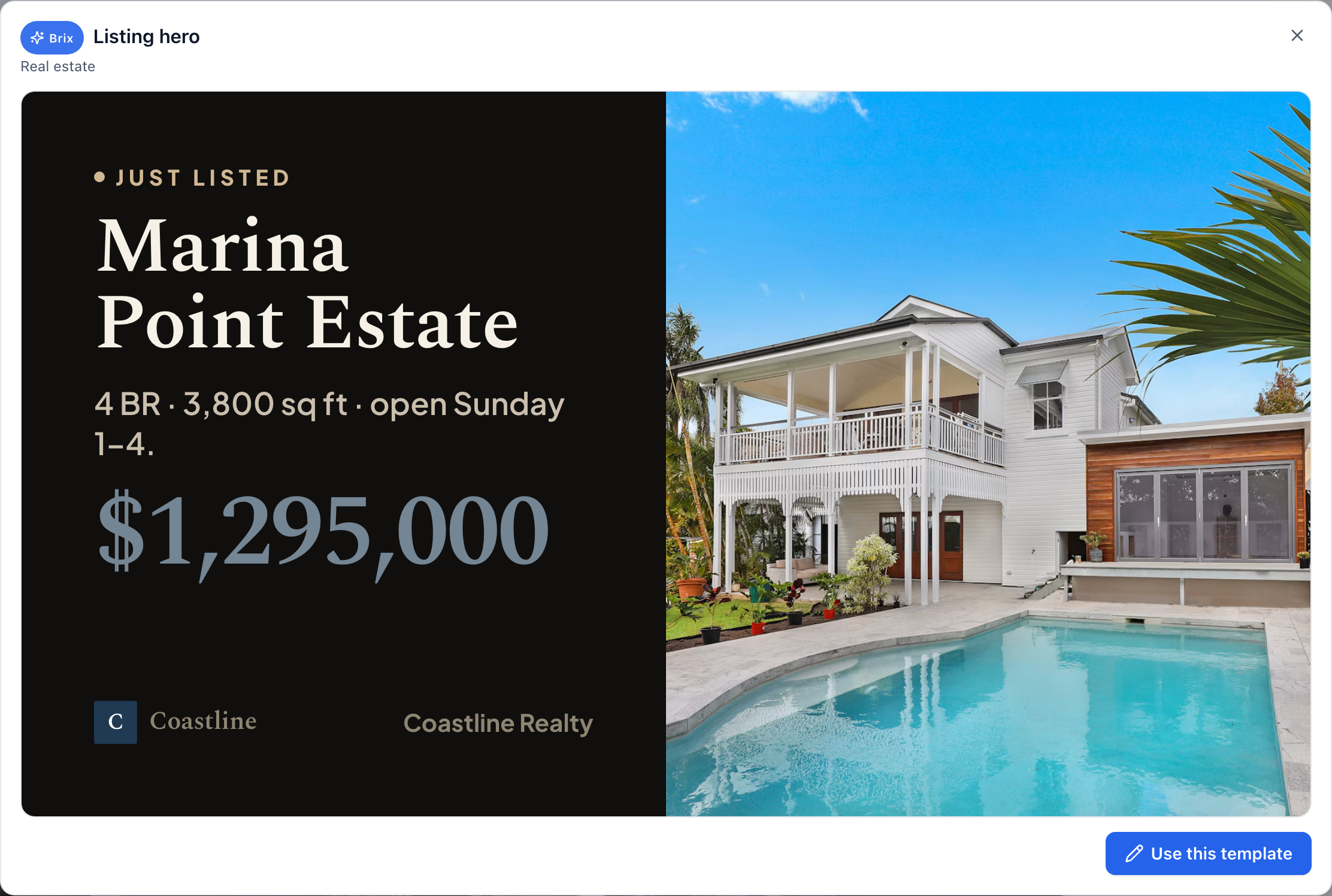
- The best exterior photo, with price and address.
- Beds, baths, size and lot.
- Three or four interior photos, one feature each.
- Upgrades and what a buyer cannot see (roof, HVAC, windows, energy costs).
- Neighbourhood: schools, commute, parks.
- A short video tour or drone footage.
- A QR code to the listing page, so buyers take the details home.
- Your name, photo and phone number.
Change it with the listing's status: "Open house Saturday 1 to 4 pm" during the week, the full presentation during the open house, then "Under contract" or "Sold" with your contact details.
What hardware do you need?
- The screen. At an open house, the home's own TV is usually enough; ask the seller first. For an empty home, a 43 to 55-inch TV on a floor stand travels well.
- A media player you can carry. The Amazon Signage Stick costs $99.99 and plugs into the TV's HDMI port. An Android box such as the Walmart onn. 4K costs less. Pick software that stores the content on the player, because the Wi-Fi at a listing is often off or unknown.
- Office windows. A home TV washes out behind glass in daylight. Window screens need a high-brightness commercial display (commonly rated 2,500 nits or more), mounted portrait to fit a listing card.
"Digital real estate signs" also means LED yard signs and digital sign riders outside a listing. Those are separate products from outdoor-sign makers; this page is about indoor screens.
Which digital signage software suits realtors?
Two kinds:
- Real-estate-specific platforms, such as KODA, which price per agent. KODA lists Solo at $50 a month for one device, Portfolio at $80 for up to 5 and Empire at $125 for up to 10 (its pricing page, September 2026).
- General signage software, priced per screen, usually $6 to $30 per screen per month. You build the listing slides yourself or from a template.
Check that the software can: work from a phone, schedule content by date and time, add a QR code, keep playing offline, and move a player from one TV to the next without setting it up again. See Brix vs KODA for a side-by-side.
What does it cost?
An agent with one listing on screen at a time, on the home's own TV: one player at $99.99 once, plus $72 to $360 a year in software at $6 to $30 per screen per month. An agent with five listings on screen at once needs five players and five screens' worth of software. See how much digital signage costs.
Mistakes agents make with listing screens
- Every photo in the album. Pick the best eight; a 40-slide loop is never seen through.
- Text too small to read from the sofa. Big numbers, few words.
- An old status. "Open house Saturday" still showing on Monday. Schedule status changes in advance.
Where Brix fits
Brix is signage software that runs on the Amazon Signage Stick, Fire TV, Android boxes and Windows PCs. It costs $6 per screen per month billed annually, or $8 billed monthly, so one listing on screen costs $72 a year. There is a 7-day free trial with no card.
- Listing slides. Build them in Brix or upload photos and video, and put them in a playlist.
- QR code. The Scan-to-action (QR) template takes your listing link. Change the page behind the link and the code stays the same.
- Status by date. Schedules switch from "Open house Saturday" to the full presentation to "Sold".
- Carry the stick. Unplug it and plug it into the next listing's TV. It stays paired to your account and plays what the CMS assigns it once it is online.
- Offline. Content is stored on the stick, so the presentation plays whether or not the home's Wi-Fi works.
Setup takes about 10 minutes: plug the stick into the TV, pick "Brix Signage" during its setup, then pair it in the CMS under Screens > Add screen > Pair a hardware device.
Brix does not pull listings from the MLS or a portal on its own. If you want every new listing to appear on the office window with no work, choose a platform that connects to your listing feed.
Start your free 7-day trial. No card needed.