Franchise Digital Signage: What It Needs to Work
Franchise digital signage needs brand-locked templates, per-location access, and billing split by site.
Franchise digital signage is one content library that every location's screens play. The design stays locked, so a location can change the price or a photo but never the logo. The bill splits too, so each site pays its own share.
Head office keeps one login for the locations it owns outright. A franchisee that runs its own business gets its own workspace instead, so its screens, users and invoice stay separate from head office's.
What does a franchise need that one store does not?
A single store needs screens that play content. A franchise needs the same screens to answer four more questions.
- Brand control. Head office designs the board. A location can retype the price or swap a photo, never move the layout or change the logo.
- Selective reach. Some content goes to every location. A regional promotion or a closing notice goes to a subset only.
- Separate money. A franchisee pays for its own screens, not on head office's card.
- One system for mixed hardware. Stores open at different times and buy different TVs. The signage needs to run on whatever is already on the wall. A retail chain's screens usually mix TVs this way more than a single store's do.
Most franchises put TV menu boards, prices and current offers on the screen, not only brand video.
How do you let a franchisee edit the price, never the logo?
Brix calls this a locked template. The designer sets, layer by layer, what a franchisee may change: nothing, the wording, the look (font, size and color), the position, or everything. A layer set to "Text" lets a franchisee retype a price or swap a photo. The layer itself cannot move, resize, or change in any other way.
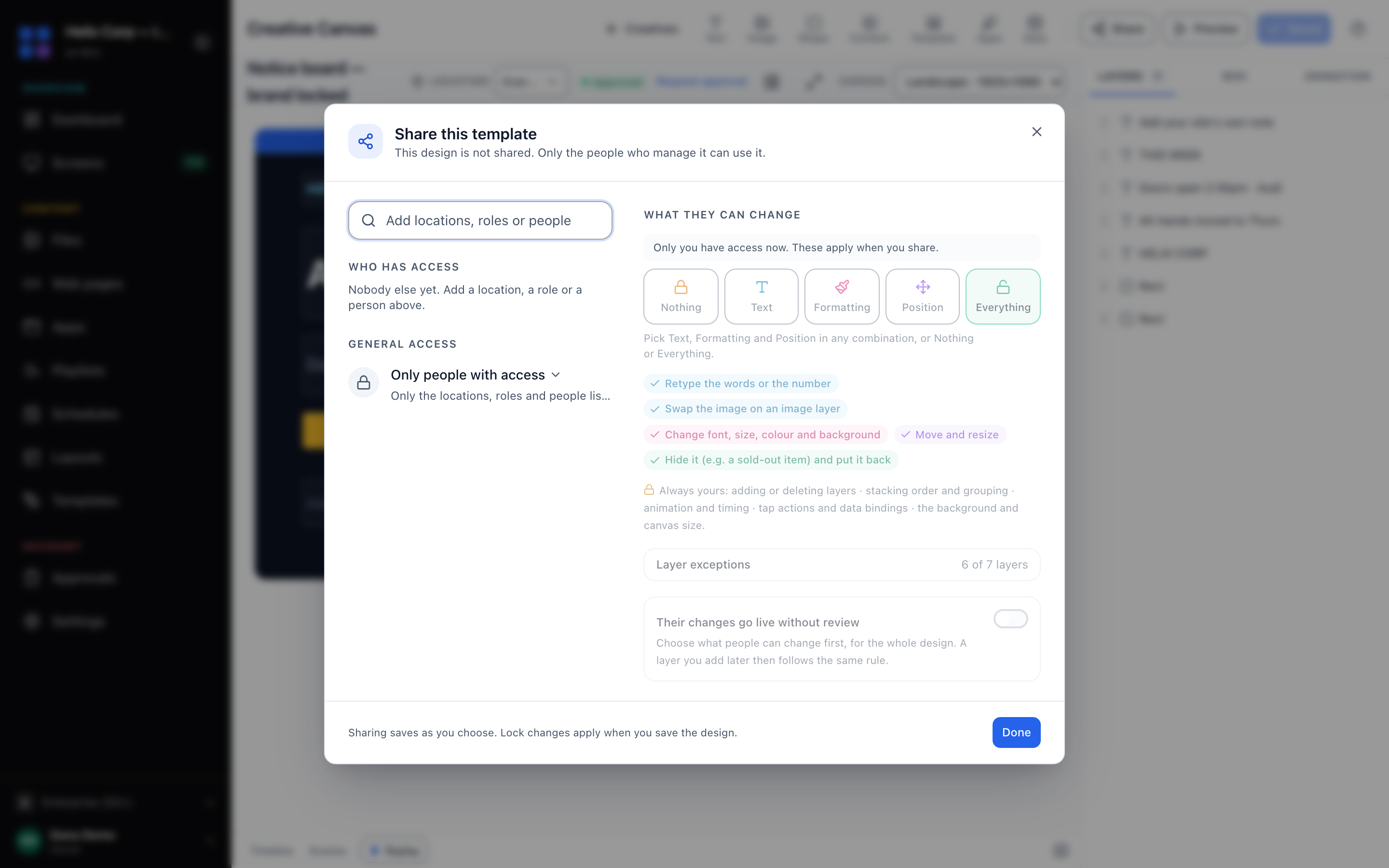
The designer alone adds or deletes a layer, sets the stacking order, and adds any animation, whatever a layer allows. A franchisee can never add a new box to someone else's design. The lock takes effect when the designer saves the design. A franchisee's old edit to a field that is now locked stops applying on the next screen update, with nothing to clean up by hand.
Can head office push content to some locations and not others?
That depends on how the locations are set up.
- Locations inside one workspace. This covers company-owned stores, or a franchise that keeps everyone in one account. A role controls which locations a person can reach, so a store manager sees only their own location's screens. A playlist or layout assigned to a group of locations reaches only that group.
- A franchisee with its own workspace. Head office shares a playlist, layout, schedule or template down to the franchisee's workspace (how sub-accounts work). The franchisee's screens play it, read-only, with the locked-template exception above. Head office edits the source, and the change reaches every franchisee it shared with, live. Head office can revoke the share to remove it from their screens.
Cross-workspace sharing needs the "Multi-tier org hierarchy" setting. The setting turns on by default once a workspace passes 50 screens. At 50 screens or fewer, a workspace can turn "Multi-tier org hierarchy" on itself, free, in Settings → Organization → Feature defaults, at any time. We help set up the hierarchy with you.
Can each franchisee get their own bill?
Yes, with a billing group: a name and a finance contact with its own subscription behind it. Assign a location's screens to a group and that group's invoice covers them. A screen with no group bills to the workspace.
A new billing group does not bill anyone on its own. Brix staff link its subscription once the site is set up. Until then, its screens keep billing to the workspace.
One workspace can run many billing groups side by side, so a 20-site chain can bill its 20 owners separately without 20 separate Brix accounts.
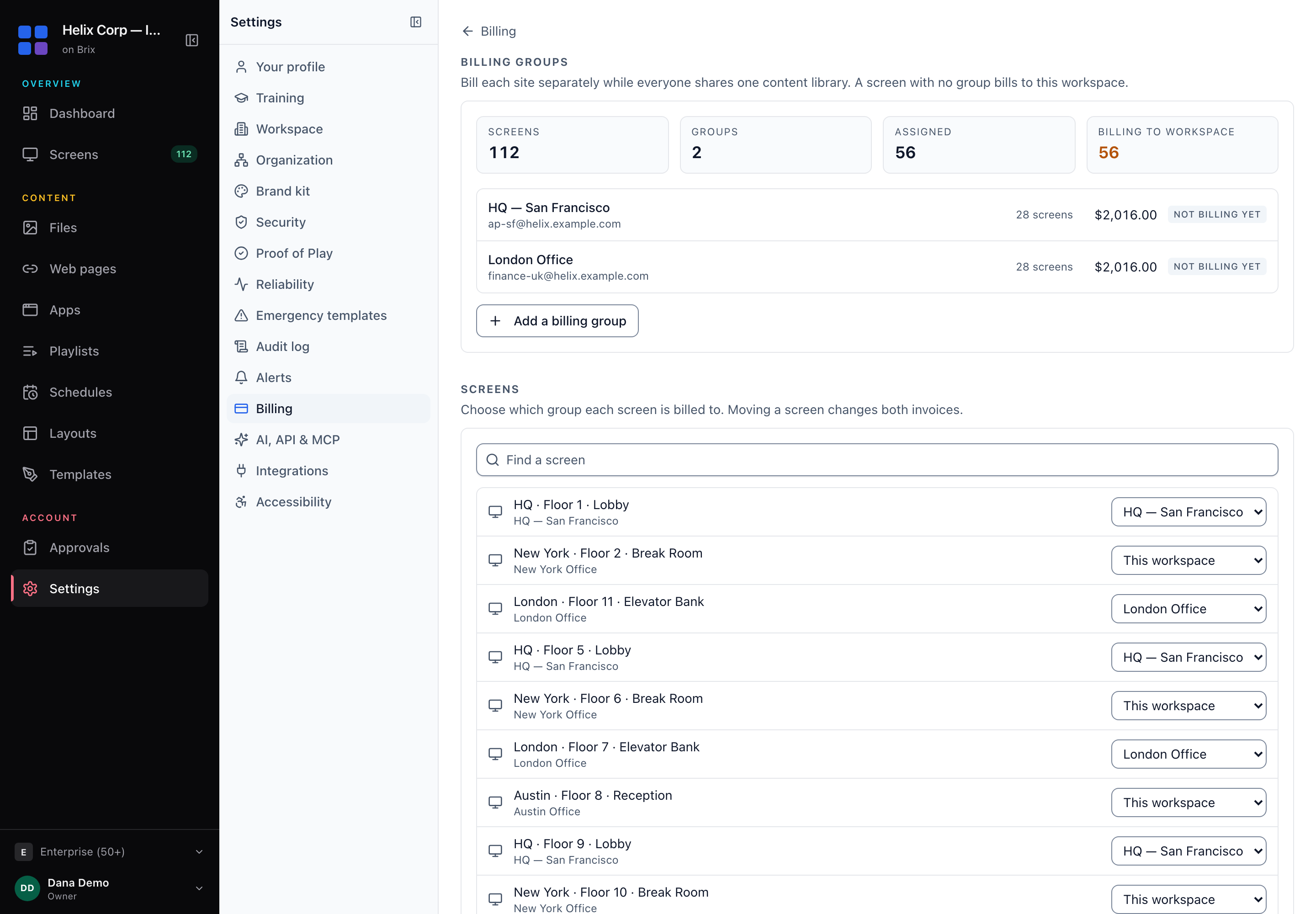
Every site is on the same plan: $6 per screen per month, billed annually, or $8 per screen per month, billed monthly. A billing group costs nothing extra, and neither does the hosting region below.
Does it work if your franchisees are in different countries?
Brix places a new workspace in one of four regions, chosen from the country it signs up from: US, EU (Frankfurt), Oceania or Asia-Pacific. The region holds the workspace's screens, media and database, so a store's screen does not cross an ocean for every update. The EU region is a contractual jurisdiction. The other three are placement, not a legal guarantee.
There is no region picker at sign-up, so contact support if a workspace signed up from the wrong country. Support can then move the workspace to the right region.
What hardware runs this?
Reuse the TVs each location already has where you can.
- A TV with Google TV or Android TV built in: install Brix from Google Play.
- Fire TV, or an Android box such as a Walmart Onn (grant "Display over other apps" on the Onn).
- No smart TV and no box yet: the Amazon Signage Stick, $99.99, pairs in about 10 minutes.
- The Windows player, for a PC already driving a screen.
Pilot in two or three stores, then roll out
Run the digital signage pilot in two or three stores before the whole franchise commits. Pair a handful of screens, test the templates and the hierarchy, and show the numbers before you ask for budget to go wider.
If you are already running another vendor, Brix moves your content, playlists and screens over for you, free, usually in a day.
For a rollout of 30 or more screens, Amazon provides free Signage Sticks. Contact Brix, and we arrange it with Amazon.
A checklist for evaluating franchise signage
Across a chain, some screens show old content, and some show nothing, until offline alerts catch it. Ask any vendor these questions before you sign, not after you roll out to 50 stores.
- Can a location edit the price or a photo without touching the design?
- Can you push a notice to every screen at once in an emergency?
- Does the vendor alert you when a screen goes dark or stale, or do you find out from a customer?
- Can a franchisee see only their own screens, not the whole chain's?
- Does each site get its own invoice, or does head office pay for everything?
- Does the software run on the TVs you already own, or does every store need new hardware?
- For a restaurant chain, can the menu board read live prices from your point-of-sale system?
- Does the price per screen change as you add sites, or does it jump to a custom quote?
Brix answers the second with an emergency takeover. Brix connects to CAP and webhook alert systems such as Singlewire, Rave and Alertus. Our team configures the connection with you. Talk to us.
Brix answers the point-of-sale question too. Brix connects to Toast, Square and Clover. Our team sets up the connection with you. Talk to us.
Where Brix is not the right fit
Brix does not stitch many physical screens into one video-wall image. For a wall, use a player built for that.
There is no separate mobile app. A franchisee manages their screens from a phone's browser, which works but is not an installed app. If a franchisee needs a certified on-premise deployment or a data-residency guarantee outside the EU, Brix does not offer that.
FAQ
Can we test this with a few stores before the whole franchise signs up?
Yes. Start a 7-day free trial, no card needed.
Put Brix on your screens
Live in about 10 minutes. One plan: $6/screen/month billed annually ($8 month to month). No credit card to try.
Start Free TrialBrix for other industries