Digital Signage for Healthcare: Clinics & Hospitals
See what belongs on a clinic or hospital waiting room screen, from queue numbers to content approval.
Digital signage for healthcare means screens in a waiting room, a hallway or an exam room that show a queue number, wait status, health information and facility notices, updated from one dashboard instead of a stack of printed signs. A clinic runs one or two screens near the front desk. A hospital or a multi-location health system runs the same kind of screen across dozens of rooms and buildings, with content sign-off and a record of who changed what.
What belongs on a waiting room screen
A waiting room screen earns its place by doing four jobs: show status, give useful information, post practical notices, and push an urgent notice when something happens. Beyond that, every extra slide is dead air patients stop watching.
- A queue or wait number. The thing patients watch most. It has to update without anyone walking over to the TV.
- Health content that matches the room. A cardiology waiting room should show heart-health tips, not generic wellness slides nobody reads twice.
- Practical notices. Opening hours, parking, where the restroom is, what to do if a patient has not checked in yet.
- An emergency or urgent-notice override. One action that replaces every screen's content with an urgent message, then returns to normal content once it ends.
No patient name, date of birth or chart number belongs on a public screen, whatever signage system runs it. Keep a queue number anonymous: a number alone, or a first name and last initial, never a full name.
Digital signage for hospitals vs a single clinic
The screens look the same. What is different is scale, and who is allowed to change what.
A single clinic has one front desk and one person who updates the screen. A hospital or a multi-location health system has:
- Several buildings, each with its own waiting rooms and hallways.
- Marketing or communications staff who write content, and front-desk or clinical staff who should not be able to publish it unreviewed.
- A compliance team that, after a complaint or an incident, needs to know exactly what was on a screen and who put it there.
A clinic or hospital rollout checklist
Decide these on paper before you buy anything:
- Which rooms get a screen. Waiting room first, then hallways, then exam rooms if you want condition-specific content there.
- Who writes content, and who approves it. Decide this before go-live, not after a wrong flyer goes up on every screen at once.
- Where the wait number comes from. A staff member tapping a button, a shared spreadsheet, or a queue system with its own feed. Each needs a different setup.
- Screen hours. A clinic that closes at night should turn its screens off; a hospital lobby that runs all day should not.
- Staff-only screens. A break room or staff lounge screen can skip approval and stay self-serve, even where patient-facing screens need sign-off.
- What never goes on screen, written down and given to everyone who can publish content: no patient names, no dates of birth, no chart numbers.
- Who gets the alert if a screen goes dark or stops reporting in.
Where Brix fits for healthcare signage
Brix is a digital signage platform: a cloud dashboard that manages what plays on screens over Fire TV, the Amazon Signage Stick, Android boxes, TVs with Google TV or Android TV built in, and the Windows player. Five parts of it answer the gaps above directly.
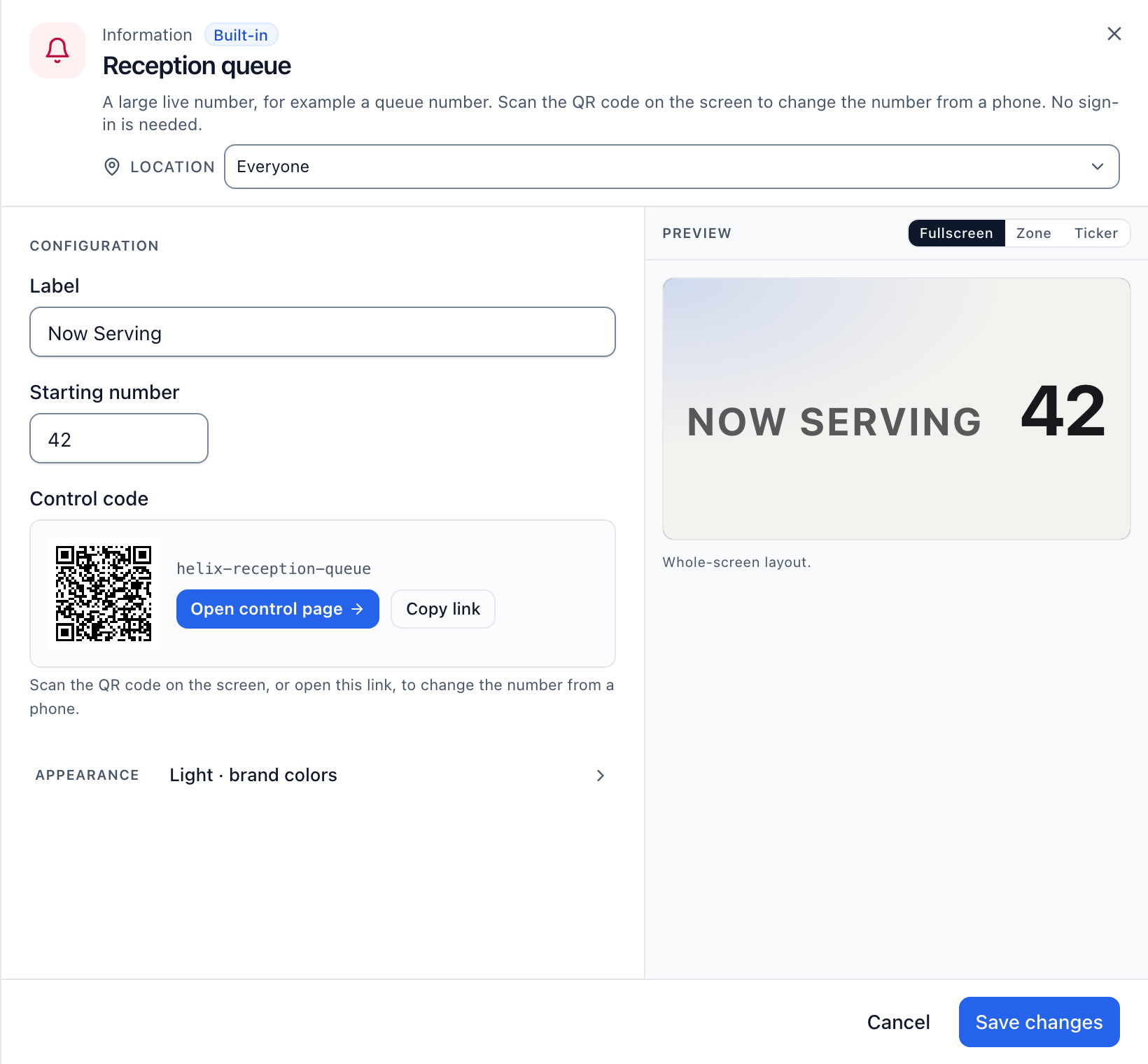
A queue number a staff member changes from a phone. The Now Serving app shows a large live number on screen. A staff member scans the QR code shown on that screen with a phone, or opens the link, and taps to move the number up. No sign-in and no extra hardware.
For a number that should come from your own scheduling sheet instead of a tap, connect the sheet under Data sources > Google Sheets and place that value in a design. See live data on screen for the steps. That covers a front desk that already tracks wait times in a spreadsheet. It is not a connection to an electronic health record or a dedicated hospital queueing system; Brix has no EHR integration.
Push an urgent notice to every screen. Emergency takeover replaces every screen's content with your message, then returns it when you end the takeover. It is on by default from 11 screens; a smaller clinic's owner switches on Emergency alert integrations in Settings → Organization → Feature defaults. Brix connects to CAP and webhook alert systems such as Singlewire, Rave and Alertus. Our team configures the connection with you. Talk to us.
Content sign-off, set per location. In Settings → Organization → Structure, pick a location and set its Approval to "Needs approval first." Content aimed at that location then sits in the Approvals inbox until a member with the Approver role for that location accepts it. Nobody with a login to the account can put an unapproved playlist, schedule or screen design live at that location, whether or not they remembered to send it for review. A workspace with 11 or more screens gets this inbox and the audit log on by default; a smaller clinic's owner switches on Approval workflows and Audit log for free in Settings → Organization → Feature defaults.

An audit log of every change. Settings → Audit log lists every change to a workspace: who did it, when, and from where. It is append-only, kept for three years, and can be exported to a SIEM feed for a compliance team that wants its own copy.
Screen hours and hardware for either setting. A clinic sets "Standard hours" (6:00 am to 11:00 pm) so screens turn the TV off at night over HDMI-CEC; a hospital lobby that runs all day sets "Always on" instead. The Amazon Signage Stick ($99.99, about 10 minutes to pair) suits one or two screens at a front desk; Fire TV and Android boxes cover existing hardware. Brix is $6 per screen per month billed annually, or $8 billed monthly, with a 7-day free trial and no card needed.
What Brix does not claim. Brix does not hold a HIPAA certification, a SOC 2 report or any other compliance certification. It also does not do touch kiosks or wayfinding: a Brix screen here is one-way signage, not an interactive directory. See the FAQ below for what the certification gap means in practice.
FAQ
Is Brix HIPAA compliant?
No. Brix does not claim HIPAA compliance, and does not hold a SOC 2, ISO 27001 or any other security certification. No vendor's certification status changes what belongs on a public screen: keep patient names, dates of birth and chart numbers off every waiting room, hallway and lobby display, on any system. Use an anonymous queue number instead, as described above.
Who approves content before it reaches a clinic's screens?
Whoever has the Approver role for that location. Set a location's Approval to "Needs approval first" in Settings → Organization → Structure, then give a person the Approver role, scoped to that location, in Settings → Organization → People. The rule is per location, so a hospital can require sign-off at patient-facing lobbies while leaving a staff break room screen on self-serve, as long as that screen sits in its own location.
To see Now Serving, Emergency takeover, Approvals and the audit log on your own screens, book a demo.
Put Brix on your screens
Live in about 10 minutes. One plan: $6/screen/month billed annually ($8 month to month). No credit card to try.
Start Free TrialBrix for other industries