The best OptiSigns alternative for a small business, school or multi-site chain is Brix: one plan at $6 per screen per month billed annually, or $8 billed monthly, with roles, approvals, proof of play, TV on/off and the API included. Brix runs on the Amazon Signage Stick. Free migration, usually in a day, moves your content, playlists and screens over. On OptiSigns those features start on Pro Plus, $13.50 annual or $15 monthly.
- One free screen: Yodeck.
- Lowest paid price: Juuno, $5 per screen.
- Free with no screen limit: AbleSign.
- Apple TV, with SSO and SCIM on Pro: Kitcast.
- Lowest cost for a school that needs roles and approvals, up to 19 screens per school: Brix.
- K-12 specialist built for schools: Rise Vision.
Stay on OptiSigns if you need its kiosk builder, its 100+ app library or on-premise hosting. Brix wrote this page and says where each option, Brix included, is the wrong choice.
How much does OptiSigns cost?
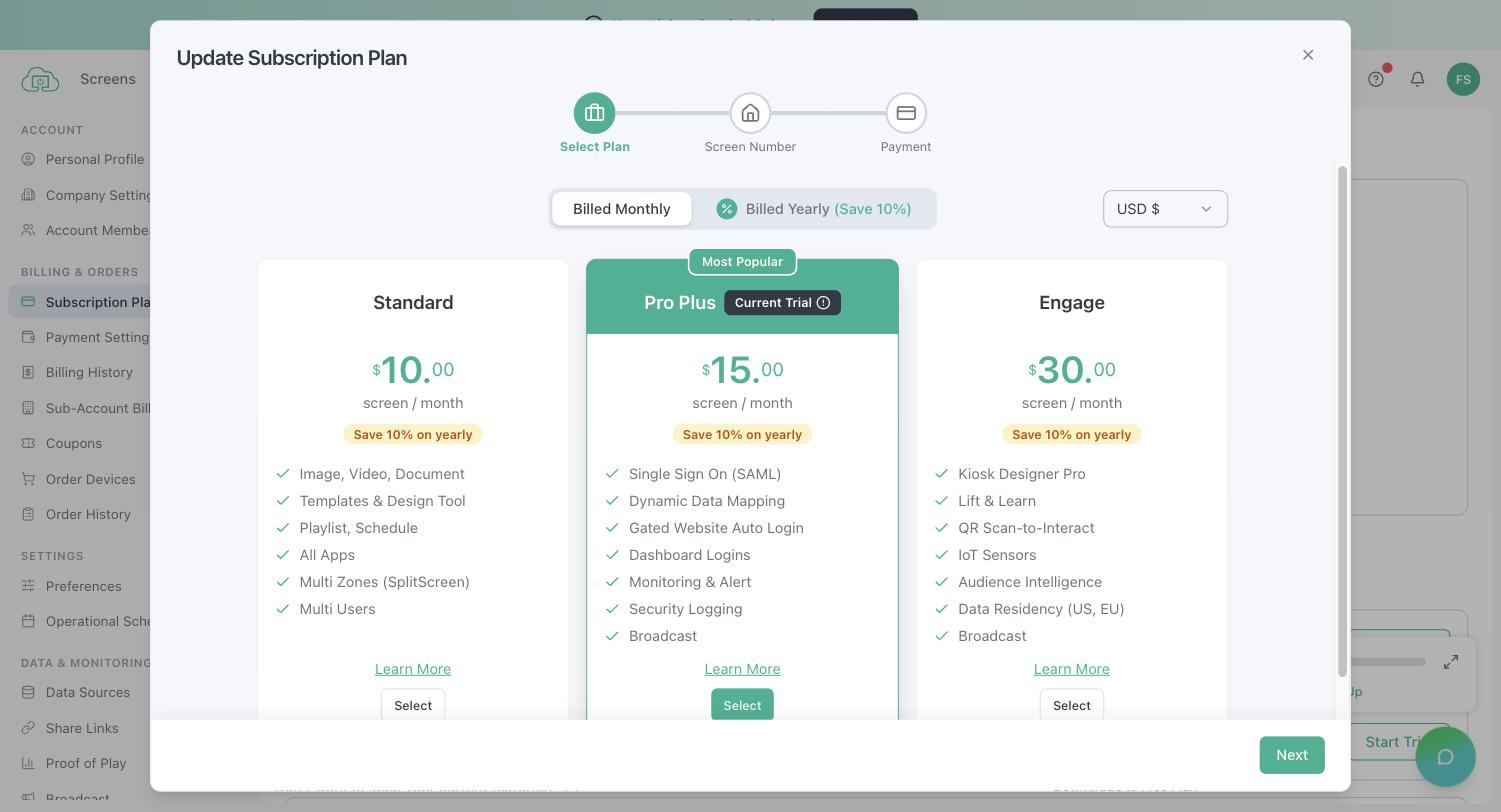
From OptiSigns' pricing page and plan comparison, per screen per month:
| Plan | Annual | Monthly | What it adds |
|---|---|---|---|
| Free | $0, up to 3 screens | OptiSigns logo on screen, 25 apps, 1 GB storage, 25 MB per file, no schedules, zones or templates | |
| Standard | $9 | $10 | Schedules, zones and templates, no logo |
| Pro Plus | $13.50 | $15 | Roles, approval workflow, proof of play, audit logs, SAML, TV on/off, remote device commands, dashboards, Slack and Teams |
| Engage | $27 | $30 | Kiosk designer, check-in, QR interactions, IoT |
| Enterprise | $40.50 | $45 | 25-screen minimum, mass provisioning, on-premise or private cloud, GraphQL API |
- A video wall is an add-on: $25 per wall per month.
- OptiSigns' own players: OptiStick $99.99, Pro Player $349, ProMax Player $799.
- The 14-day trial has every feature. When it ends without a paid plan, the account drops to Free.
Why do people look for an OptiSigns alternative?
- The tier ladder. Standard leaves out roles, approvals, proof of play, audit logs and TV on/off. A team across several sites ends up on Pro Plus at $13.50 to $15.
- Remote control needs OptiSigns hardware. Reboot, screenshot, HDMI-CEC TV on/off and Wi-Fi changes need an OptiStick, Pro or ProMax player AND Pro Plus. On Free or Standard, a closing-time schedule only shows black; the TV stays on.
- The free plan does not run on most screens. OptiSigns' help centre lists it as not supported on Amazon devices (Signage Stick, Fire TV), Roku, Samsung and LG smart TVs, ChromeOS, Apple TV and BrightSign.
- Fire TV is on its way out. OptiSigns says it will end support for Fire TV Sticks, and it does not support current Fire OS 8 sticks (Fire TV Stick 4K and 4K Max), which cannot start the app on their own.
- Add-ons. Video walls are billed per wall on top of the plan.
OptiSigns on the Amazon Signage Stick
OptiSigns runs on the Amazon Signage Stick ($99.99) on a paid plan. What you get there, per OptiSigns' help centre:
| On a Signage Stick | OptiSigns | Brix |
|---|---|---|
| Free plan | No | No free plan, 7-day trial |
| Content, playlists, schedules | Standard, $9 / $10 | Yes, $6 / $8 |
| TV on/off by schedule (HDMI-CEC) | No: needs an OptiSigns player | Yes |
| Remote reboot and screenshot | No: needs an OptiSigns player | Yes |
| Change Wi-Fi from the CMS | No: needs an OptiSigns player | Yes |
If you already own Signage Sticks, an alternative built for the Stick gives you the remote controls OptiSigns keeps for its own hardware. If you buy OptiSigns, its OptiStick (also $99.99) gets them, but only on Pro Plus, and it is built for OptiSigns alone.
Amazon provides Signage Sticks free for rollouts of 30 or more screens, and Brix arranges it: talk to us. See the Amazon Signage Stick review, how to reboot a Signage Stick remotely and Amazon Signage Stick vs the OptiSigns player.
OptiSigns alternatives compared
List prices per screen per month, annual / monthly:
| Platform | Entry plan | Roles, approvals and proof of play | Free option | Signage Stick | Best for |
|---|---|---|---|---|---|
| OptiSigns | $9 / $10 | Pro Plus, $13.50 / $15 | 3 screens (not on the Stick) | Paid plans | Apps, kiosks |
| Brix | $6 / $8 | Same plan | 7-day trial | Yes | Small business to multi-site chains |
| Yodeck | $8 / $8 | Premium $12 (approval by role; custom roles $16) | 1 screen | Yes | One free screen |
| Juuno | $5 monthly | Proof of play on Growth $9; no approvals | 7-day trial | Yes | Lowest paid price |
| AbleSign | Free | Roles and proof of play free; no approvals | Free, 500 MB storage | Yes | Free, no screen limit |
| Play Digital Signage | $7.20 / $8 | Ultimate $16, no approval step | First screen, for a review | Yes | Simple playlists |
| Kitcast | $7 / $9 | Pro, $10 / $14 | 14-day trial | No | Apple TV, SSO for less |
| ScreenCloud | $20 / $24 | Pro, $30 / $36 (approval by role only) | 14-day trial | Yes | Enterprise internal comms |
| Rise Vision (K-12) | $119 per display per year | Approvals on Enterprise, $164 per year | 14-day trial | Yes | K-12 schools |
The alternatives, one by one
Brix
- Price: $6 per screen per month billed annually, or $8 billed monthly. One plan. 7-day trial, no card.
- Best for: shops, restaurants and multi-site chains that want Pro Plus features at less than half the price.
- Players: Amazon Signage Stick, Fire TV, Android boxes, TVs with Google TV built in, Windows.
- Strengths: custom roles, access per location, approvals, audit log, proof of play (off by default), TV on/off by schedule, remote reboot and screenshots on the Signage Stick, offline alerts, the API, OIDC single sign-on and SCIM on the one plan. A Signage Stick sets up in about 10 minutes. We move your content, playlists and screens from OptiSigns for you, free, usually in a day. US-based support in Los Angeles, 7 days a week.
- Watch out for: no SAML, no SOC 2 report, no synced video wall, no kiosk builder, no on-premise hosting, and no LG webOS, Apple TV or BrightSign player. Fewer public reviews than older vendors.
Yodeck
- Price: Basic $8, Premium $12, Enterprise $16, the same billed annually or monthly. One screen free.
- Best for: one free screen, or a free Yodeck Player with an annual plan.
- Players: its own player, the Signage Stick, Fire TV, Samsung Tizen, LG webOS, BrightSign, Windows.
- Strengths: every Basic feature on the free screen; wide player support.
- Watch out for: custom roles need Enterprise ($16), and approval works through a role that cannot publish (Premium and up), not a request queue. More in Yodeck alternatives.
Juuno
- Price: Business $5, Growth $9 per screen per month. Monthly prices only. 7-day trial.
- Best for: the lowest paid price for simple screens.
- Players: the Signage Stick, Fire TV, Android, Raspberry Pi, smart TVs and Chromecast.
- Strengths: unlimited users and every app on Business; proof of play on Growth.
- Watch out for: no approval step; advanced roles and the API are marked "Soon" on its pricing page.
AbleSign
- Price: free, no per-screen charge. Storage is 500 MB free (about 15 short videos); 100 GB costs $9.99 a month.
- Best for: a tight budget with mostly images.
- Players: Android 7 and later, the Signage Stick, Fire TV Stick, BrightSign, any web browser.
- Strengths: roles and proof of play at no charge.
- Watch out for: no approval step, and few visible new features.
Play Digital Signage
- Price: Essential $7.20 annual or $8 monthly; Pro $12 and Ultimate $16 monthly.
- Best for: simple playlists.
- Players: runs on the Signage Stick, among others.
- Strengths: 24/7 email and chat support, single sign-on on every plan.
- Watch out for: no approval step on any plan; proof of play only on Ultimate ($16).
Kitcast
- Price: Starter $7 annual or $9 monthly; Pro $10 annual or $14 monthly. 14-day trial.
- Best for: Apple TV, and team features for less than OptiSigns.
- Players: Apple TV; Fire TV named, the Signage Stick not.
- Strengths: roles, approvals, SSO, SCIM, audit log and the API on Pro. The closest rival to Brix on price for team features.
- Watch out for: Starter has none of the team features.
ScreenCloud
- Price: Core $20 annual or $24 monthly; Pro $30 annual or $36 monthly.
- Best for: internal communications in large companies.
- Players: the Signage Stick, ScreenCloud's own players and more.
- Strengths: employee-app and Microsoft integrations on Pro.
- Watch out for: costs more than OptiSigns at every tier. More in ScreenCloud alternatives.
Rise Vision: the OptiSigns alternative for education
- Price: K-12 $119 to $164 per display per year, or $1,399 per school per year for unlimited displays.
- Best for: K-12 schools and districts.
- Players: its own media player ($300 outright) or the Amazon Signage Stick ($99.99).
- Strengths: CAP emergency alerts, SOC 2 Type II, long experience in education. The unlimited licence beats per-display Enterprise from about 9 displays.
- Watch out for: no public API, no weekend support. See the per-screen cost table just below for how it compares with Brix at scale.
OptiSigns alternatives for education
For a K-12 school or district that needs roles and approvals, the lowest-cost OptiSigns alternative is Brix, up to 19 screens per school; the specialist built for education, with CAP emergency alerts, is Rise Vision.
Where schools use either platform:
- Cafeteria and hallway menu boards and announcements.
- Front-office and lobby screens with the day's schedule and visitor instructions.
- Gym, auditorium and hallway event signage.
- An emergency alert pushed to every screen in a building at once.
Per-screen cost at scale. Brix charges one price per screen. Rise Vision charges per display, or a flat licence per school for unlimited displays. Using Brix's annual price ($6 per screen per month, $72 per screen per year) against Rise Vision's K-12 Enterprise tier (teacher roles and approvals, $164 per display per year) and its unlimited-display school licence ($1,399 per year):
| Screens in the school | Brix (annual) | Rise Vision Enterprise | Rise Vision unlimited licence |
|---|---|---|---|
| 5 | $360 | $820 | $1,399 |
| 10 | $720 | $1,640 | $1,399 |
| 19 | $1,368 | $3,116 | $1,399 |
| 20 | $1,440 | $3,280 | $1,399 |
Brix costs less up to 19 screens. Past that, Rise Vision's unlimited school licence is cheaper per screen.
Ease of use for non-IT staff:
- A front-office or media-centre staff member runs the CMS in a phone browser; no separate app to install.
- Pairing an Amazon Signage Stick takes about 10 minutes, so a school can set up a new screen without calling IT.
- Custom roles limit a staff member to one school's screens, so a district office can hand day-to-day updates to each school without risking another campus's content.
- With approval turned on for a school, nothing reaches its screens until someone signs it off, and the district office can be a second reviewer.
Emergency alerts. Brix connects to CAP and webhook alert systems such as Singlewire, Rave, Alertus and Centegix. Our team configures the connection with you. Talk to us.
Watch out for: Brix has no kiosk builder and less experience in K-12 schools than Rise Vision; see the Brix listing above for its full list of gaps, and digital signage for schools for what to show on school screens.
Brix vs OptiSigns
| Brix | OptiSigns | |
|---|---|---|
| Price for roles, approvals, proof of play | $6 annual, $8 monthly | $13.50 annual, $15 monthly (Pro Plus) |
| Free option | 7-day trial | 3 screens free (OptiSigns players, computers, Raspberry Pi), 14-day trial |
| Players | Signage Stick, Fire TV, Android, Google TV, Windows | OptiStick, Signage Stick (paid plans), Android, Samsung, LG, BrightSign, Raspberry Pi, Windows, ChromeOS |
| TV on/off and remote reboot | Signage Stick, same plan | OptiSigns players only, Pro Plus |
| Single sign-on | OIDC and SCIM | SAML (Pro Plus) |
| Kiosks | Tap actions and a touch mode, no kiosk builder | Kiosk designer (Engage, $30) |
| Security report | None | SOC 2 Type 2 |
For 5 screens over 3 years on annual billing with a $99.99 player each:
- Brix: $1,579.95 ($1,080 software, $499.95 Signage Sticks).
- OptiSigns Standard: $2,119.95, without the team features or TV on/off.
- OptiSigns Pro Plus: $2,929.95 ($2,430 software, $499.95 OptiSticks).
How to switch from OptiSigns
- Start a Brix trial and build playlists and schedules while OptiSigns still plays. Or send us access: we move content, playlists and screens for you, free, usually in a day.
- Move each Signage Stick. Remove it from your Amazon Signage account, factory reset it and pick Brix Signage in setup. Then pair it in Brix: Screens > Add screen > Pair a hardware device. Allow about 10 minutes per stick. See change the CMS on a Signage Stick.
- Replace OptiSticks. The OptiStick is OptiSigns' own player. A Signage Stick costs the same $99.99 and runs Brix.
- Cancel or reduce your OptiSigns plan. Removing screens does not cancel the subscription.
More on timing and contracts in switching digital signage provider.
OptiSigns vs Yodeck and ScreenCloud
- OptiSigns vs Yodeck: Yodeck is cheaper at every tier ($8, $12, $16 against $10, $15, $30) and gives a free player on annual plans. OptiSigns puts roles, approvals and proof of play together on Pro Plus and has a kiosk builder.
- OptiSigns vs ScreenCloud: OptiSigns costs less at every tier and has a free plan. ScreenCloud has stronger internal-comms integrations and unlimited storage on every plan.
OptiSigns alternative FAQ
Is there a free OptiSigns alternative?
Yes. Yodeck gives one screen free, AbleSign has no per-screen charge, and OptiSigns itself is free for up to 3 screens with its logo on screen. Brix has no free plan. It gives a 7-day trial, no card needed.
Can I move from OptiSigns without losing content?
Yes. Brix moves your content, playlists and screens from OptiSigns for you, free, usually in a day. The steps are above, under how to switch from OptiSigns.
Does an OptiSigns alternative work on the Amazon Signage Stick?
Brix, Yodeck, Juuno, AbleSign, Play Digital Signage, ScreenCloud and Rise Vision all run on the Amazon Signage Stick. OptiSigns needs a paid plan to run on the Stick at all. On the Stick, OptiSigns also loses remote reboot, screenshots and TV on/off, because those need an OptiSigns player.
Start a free 7-day Brix trial. No card needed. For a wider comparison, see best digital signage software.