Hotel Digital Signage: What to Show and Where
Hotel digital signage covers lobby, event and restaurant screens: where to put them, what to show, and what it costs.
Hotel digital signage is the set of screens in the lobby, at the front desk, outside meeting rooms and in the restaurant that show welcome messages, amenity hours, event boards and daily menus. One person updates the content from a browser, and every screen it is sent to updates at once, instead of someone reprinting and re-taping a sign.
Most hotels start with a front-desk or lobby screen, then add a meeting-room door sign and a breakfast-room or restaurant menu board. Each screen needs a TV or display, a small media player behind it (unless the TV runs the signage app itself), and software to manage the content.
What should hotel screens show?
- A welcome message, for a specific group or just the hotel's own name and the date.
- Weather and local information. Guests ask the front desk for both; a lobby screen can answer before they do.
- Amenity hours. Pool, gym, spa and business center hours, especially when they change on weekends or holidays.
- Event and meeting-room boards. The current booking and the next one, outside each room, so nobody has to ask which room a session is in.
- The breakfast room or restaurant menu, switched between breakfast, lunch and dinner on a schedule.
- Offers. A later checkout, a spa slot, a dinner reservation, or a room upgrade.
- Wayfinding. Directions to the pool, the gym, the elevators, or the meeting floor.
- Back-of-house content, on separate screens staff see and guests do not: shift notes, arrivals, and training clips.
Keep each slide to one message a guest can read while walking past with a bag.
Where should the screens go?
- Front desk or lobby. Every guest passes it at check-in and check-out.
- Meeting-room and event-space doors. Read while walking to or between sessions.
- The breakfast room, restaurant or bar. Read while deciding what to order.
- Elevator banks and guest-floor corridors. Riders have nothing else to look at for the length of the ride.
- Back of house. Staff break rooms and the area near the time clock, separate from guest screens.
What hardware does a hotel need?
- The display. About 500 nits is enough for most indoor spots. A lobby or atrium that gets direct sun needs a high-brightness panel, such as the Samsung OM55B at 3,000 nits. Match the size to where it goes: 32 inches for an elevator cab, 43 inches in portrait for a meeting-room door sign, 55 to 65 inches landscape for a lobby.
- Commercial vs. consumer. A commercial display typically carries a standard two-year warranty. Samsung's own comparison of consumer vs. commercial TVs says a consumer TV's warranty, typically 90 days, "can be voided when TV is used in a commercial setting."
- A media player, unless the TV has the signage app built in. The Amazon Signage Stick costs $99.99 and is built for this. An Android box, such as the Walmart onn. 4K, is another option.
- Wired network where the Wi-Fi is weak. Lobby and elevator-bank Wi-Fi is often the weakest in the building. Amazon's micro-USB Ethernet Adapter for the Signage Stick costs $14.99.
What does hotel digital signage cost?
Software for this kind of rollout runs from about $5 to $24 per screen per month, depending on the vendor, plan and billing:
| Plan | Price | Notes |
|---|---|---|
| Juuno Business | $5 per screen per month | Monthly only; no annual plan shown |
| Screenly Starter | $15 per screen per month billed annually, or $17 monthly | Up to 5 screens |
| Fugo Essential | $20 per screen per month billed annually, or $24 monthly |
If the hotel needs new displays too, not just software: a standard 43- to 55-inch commercial display costs about $350 to $1,000, plus $150 to $2,500 or more per screen to mount and cable, depending on the site, per a hotel signage buyer's guide.
For a 5-screen start (front desk, one meeting-room door, the breakfast room, and two elevator banks) on TVs the hotel already owns: five Amazon Signage Sticks cost $499.95 once, and software at $5 to $24 per screen per month comes to $300 to $1,440 a year for those five screens. See how much digital signage costs for the fuller breakdown, including larger rollouts.
Mistakes hotels make with signage
- A manual event board. A door sign someone has to remember to change between sessions goes stale by the second meeting of the day.
- An offer with no end date. Last month's spa promotion still on screen looks like nobody is paying attention.
FAQ
Can digital signage replace the TV channels in a guest room?
No. In-room entertainment runs on the guest-room TV's own platform, such as LG's Pro:Centric, built by the TV or set-top vendor. Public-area signage software runs on its own separate screens in the lobby, meeting rooms and restaurant, not inside the guest-room TV menu.
Does the front-desk screen need to turn off at night?
No. A 24-hour front desk should stay on all the time. Other screens can turn off outside opening hours on their own schedule.
Can the breakfast room or restaurant screen change its menu by itself?
Yes, with a schedule: the menu board switches from the breakfast menu to lunch and dinner at set times, so nobody has to remember to swap it by hand.
What happens if the hotel's own Wi-Fi needs a sign-in page first?
Guest and venue Wi-Fi is often behind a captive portal: a sign-in or terms page a device must accept before it gets real internet access. A screen being set up on that network can stall there until someone opens that same Wi-Fi on a phone or laptop and accepts the terms.
What happens if the hotel's internet goes down?
Most signage players keep showing the content already stored on the device until the connection returns.
Can a hotel group give every property its own screens under one login?
Yes. Many signage platforms let a group set up each property as its own account under one login, with roles that limit a property's staff to their own screens while head office sees every property.
Does hotel digital signage connect to our property management system, such as Opera or Mews?
Some do. Keywest Technology's Breeze, for example, syncs with Oracle's OHIP to show meeting-room assignments and upcoming events on its door signs and readerboards.
Where Brix fits
Brix is signage software that runs on the Amazon Signage Stick, Fire TV, Android boxes, a TV with Android TV or Google TV built in, or the Windows player. It costs $6 per screen per month billed annually, or $8 billed monthly, with a 7-day free trial and no card needed. Setup takes about 10 minutes per screen.
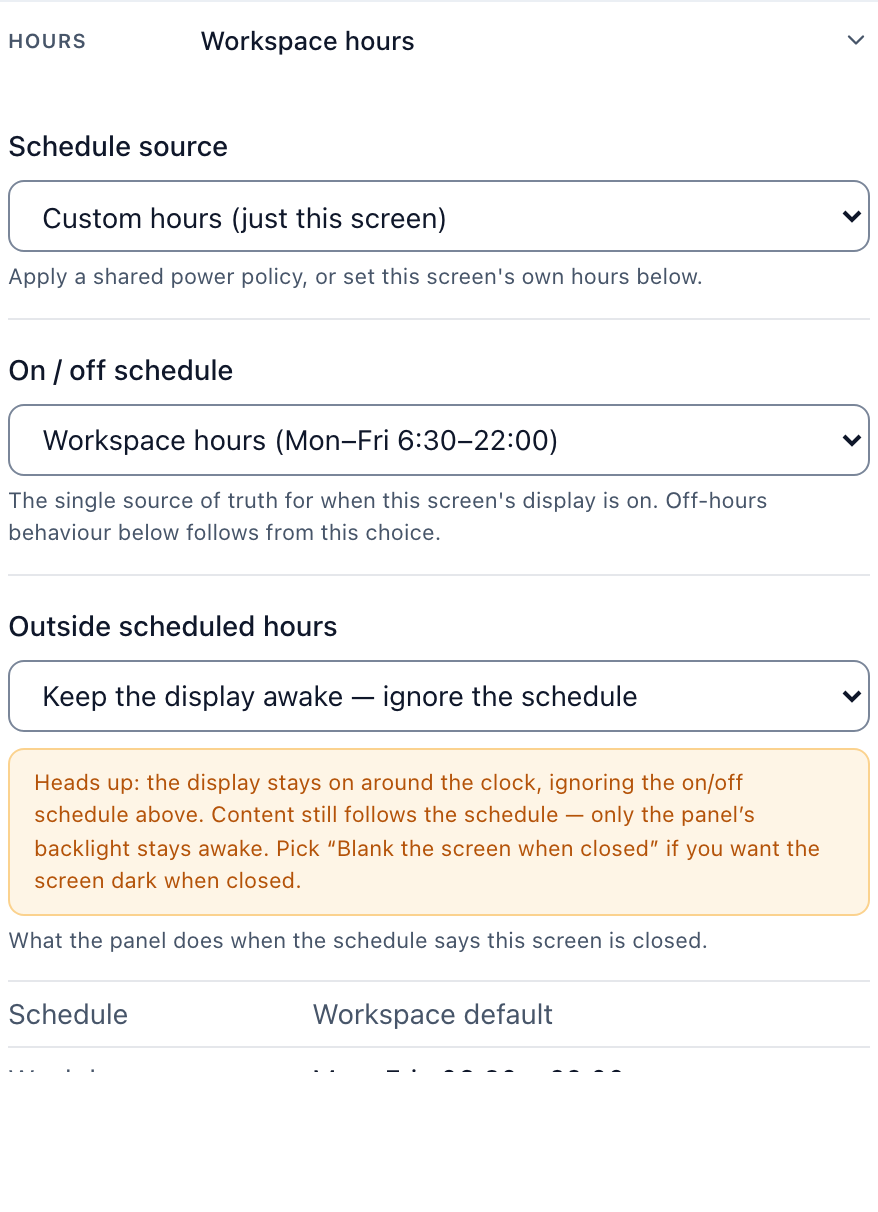
- A front desk that never goes dark. Set the screen to Always on instead of the default Standard hours (6 am to 11 pm), which fits a breakfast room or meeting-room door better.
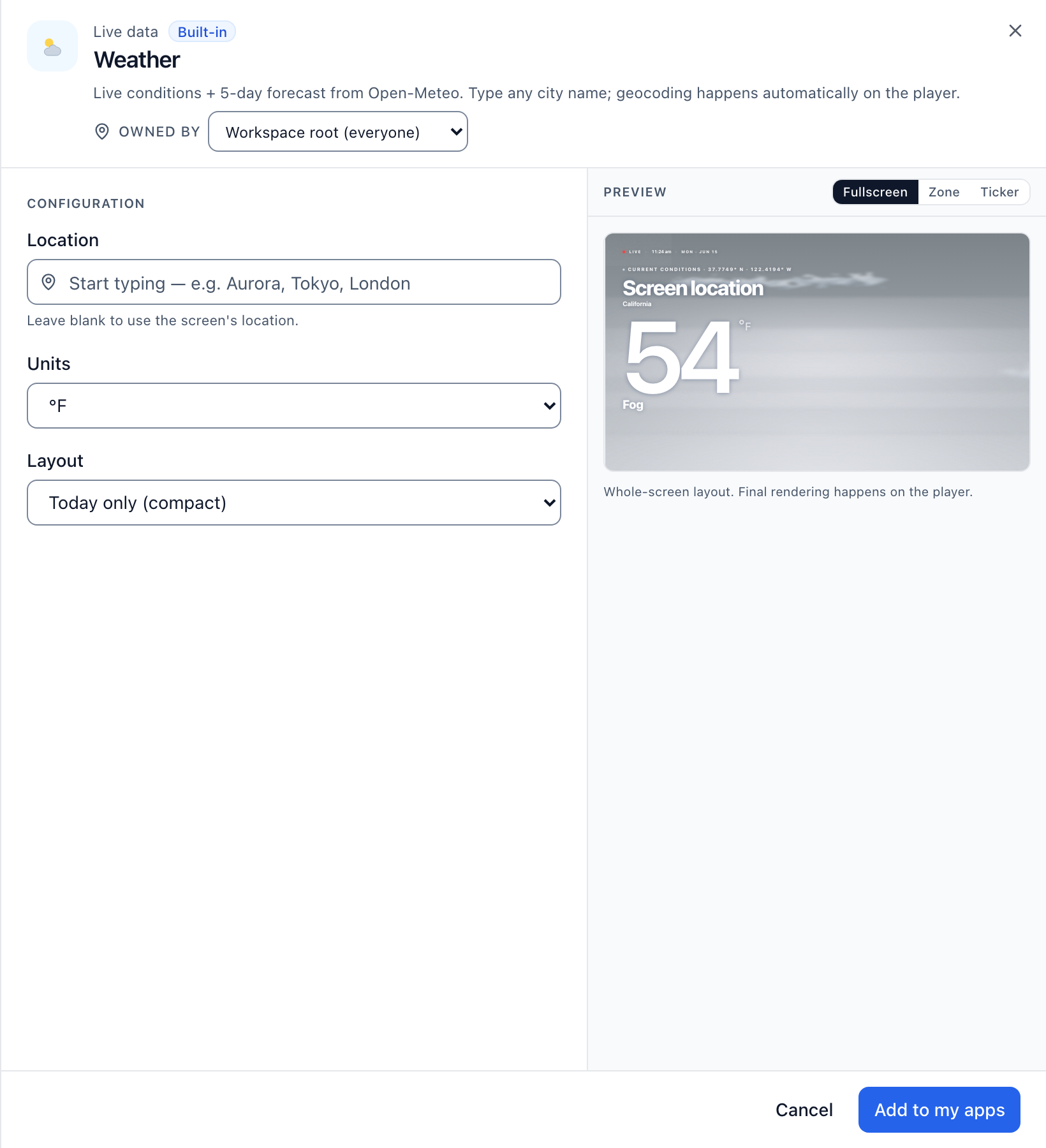
- Weather and a welcome message on the same screen. Add the Weather app from the app store, next to a welcome or event message in your own brand colors.
- A portrait door sign that plays video the right way up. On the Signage Stick, Brix rotates the whole display, video included, so a 43-inch portrait meeting-room sign shows video right side up instead of stretched or cropped.
- Meeting-room doors. Connect a Google or Microsoft 365 calendar and a door sign shows Available or Busy, the current booking and the next one. Brix has no Opera or Mews integration; the meeting-room board follows a calendar, not the property-management system.
- A breakfast or restaurant menu board with live prices. Brix connects to Toast, Square and Clover. Our team sets up the connection with you, so item names and prices on the menu board match what the POS has.
- Screens and data in your region. Brix places each workspace's screens, media and database in the region it signed up from: US, EU, Oceania or Asia-Pacific. Screens in that region then load new content from storage near them, not across an ocean. Only the EU region comes with a contractual guarantee that the data stays there.
- Each property keeps its own screens. Give each property its own workspace under one login. Staff roles stop at their own property; head office sees all of them.
- Emergency messages. Brix connects to CAP and webhook alert systems such as Singlewire, Rave, Alertus and Centegix. Our team sets up that connection with you.
- Setting up on the hotel's own Wi-Fi. On the Amazon Signage Stick and Android players, if that Wi-Fi needs a sign-in page, the pairing screen says so by name and tells whoever is setting it up to open a browser on another device and accept it there, instead of a generic "check your internet" message.
- Screens keep playing when the Wi-Fi drops. Content already downloaded keeps showing. Brix lets content use up to half of a player's storage, so there is more to fall back on before the connection returns.
Brix runs the public-area screens, not the guest-room TV channels. To use a Samsung or LG TV as a signage screen, plug a Signage Stick or Android box into its HDMI port.
Start your free 7-day trial. No card needed.
Put Brix on your screens
Live in about 10 minutes. One plan: $6/screen/month billed annually ($8 month to month). No credit card to try.
Start Free TrialBrix for other industries